Introduction
The Razer Viper V3 Pro is an iconic gaming mouse. It’s the most used mouse in the pro gaming scene at the time of writing and it has rightfully become a benchmark product in its market segment. As such, expectations for a successor were sky-high. Today, the fourth iteration of this amazing mouse is here, and we’ve sent one over to our reviewer. Read our full Razer Viper V4 Pro review to find out everything you need to know about the mouse.
At A Glance
Razer Viper V4 Pro
Used by 241 players ()Staff's Choice
Pro's Choice
The Razer Viper V4 Pro is one of the best gaming mice I’ve used so far. There is little to nothing I can objectively fault it for.
Pros
- Fantastic build quality
- Switches feel great
- Fantastic gaming performances
- Very lightweight
- Web driver works nicely and is super handy
Cons
- Switches are very loud
- Perhaps not as innovative as some would have hoped for (in terms of switches)
Specs
| Sensor | Focus Pro 50K |
|---|
| DPI | 100-50000, in steps of 1 |
|---|
| Polling Rate | 125 / 500 / 1000 / 2000 / 4000 / 8000 Hz |
|---|
| Button Switches | Razer Optical Gen-4 |
|---|
| Connection | Wireless |
|---|
| Shape | Ambidextrous |
|---|
| Length | 12.7 |
|---|
| Height | 4.0 |
|---|
| Weight | 49 |
|---|
| Width | 6.4 |
|---|
Usage Over Time in the Pro Scene
First Impressions
Packaging
Inside the box of the Razer Viper V4 Pro, you will find:
- The mouse itself
- A USB-C-to-USB-A charging cable
- The hemispherical dongle
- A quickstart guide
- User documentation
- A set of Razer stickers
- Precut grip tape
That’s a pretty generous package, but I do miss a set of replacement mouse feet. The Viper’s stock skates are quite durable and reliable, but I do always appreciate it when these top-priced gaming mice include a way to replace the feet.
The Mouse
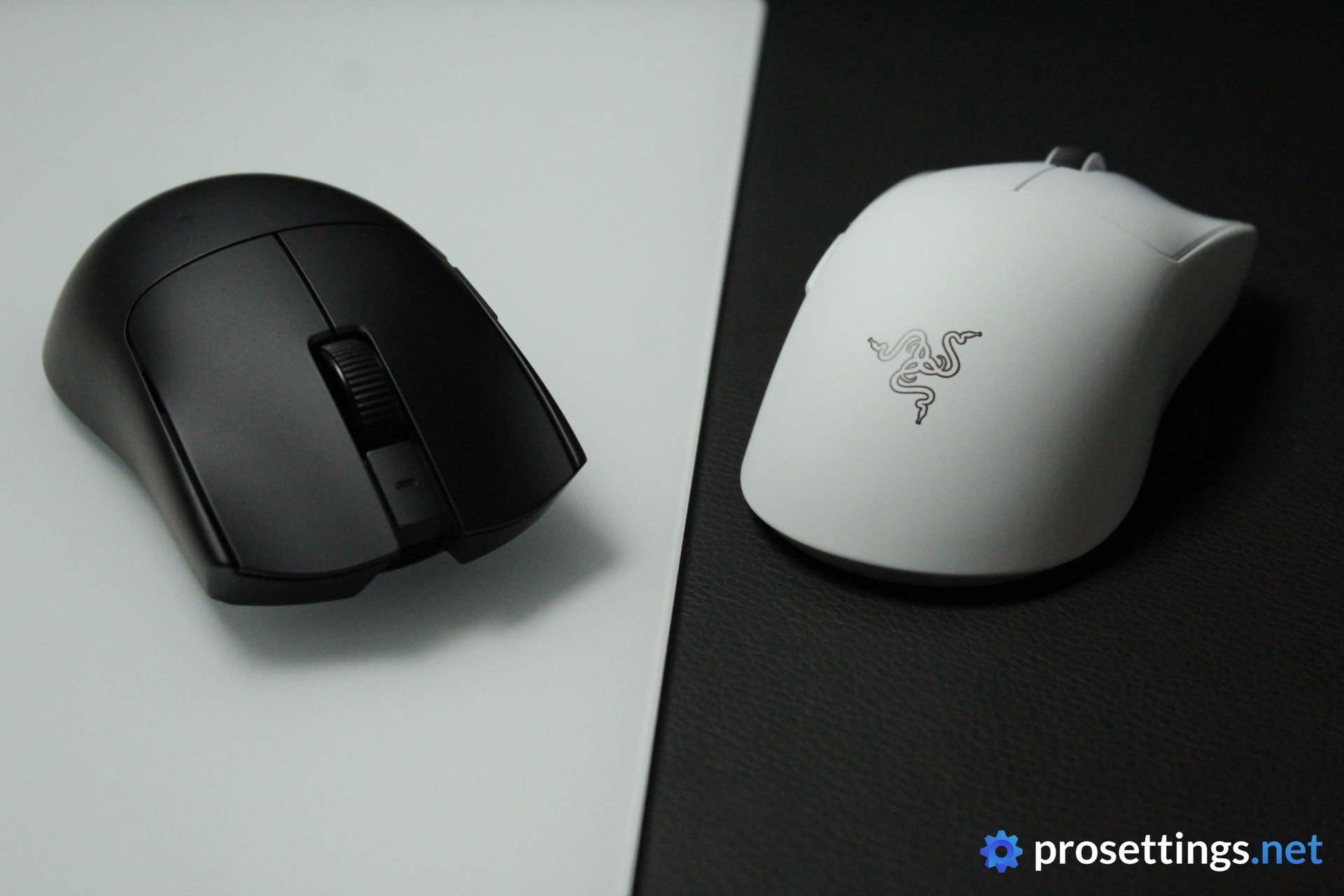
When you first unbox the mouse, there aren’t really any surprises. The most notable change at first sight comes in the form of the dongle. The older trapezoid dongle got replaced by this newer, and much heavier, hemispherical dongle. I like that change, as it’s easier to keep in an exact spot and it also has three LEDs to display information (such as battery life) about the mouse.
The mouse itself remains unchanged on the outside. With a shape that’s this popular, it would be silly of Razer to make any (big) changes so I completely understand the fact that they’re not messing with a winning recipe.
What has changed is the weight, and that’s immediately noticeable. The Viper V3 Pro has never been a particularly heavy mouse in the first place, so it’s impressive to see that Razer’s engineers and designers have managed to shave off a further 5 grams.

What’s Changed?
Razer has introduced quite a number of changes with the V4. Here are the major new things on the Viper V4 Pro compared to the Viper V3 Pro:
- The weight. This has changed from 54 grams to 49 grams.
- The sensor has been upgraded to Razer’s Focus Pro 50K Gen-3.
- Battery life: Razer HyperSpeed Wireless Gen-2 is a lot more efficient, leading to a much longer battery life on the V4 Pro (180 hours at 1000Hz, 44 hours at 8000Hz).
- Switches: the V4 Pro has Gen-4 Razer optical switches.
- Scroll wheel: an optical scroll wheel is used, which is far more durable.
- Software: you can still use Synapse to configure the V4 Pro, but you can also use a web driver.
As you can see, that’s quite a lot. The shape has remained the exact same, but under the hood there have been many changes.
Shape, Coating, and Mouse Feet
I have 18×10.5cm hands and I use a claw grip.
Shape
In many ways, the Viper line is Razer’s answer to the Logitech G Pro X line of mice. As such, it’s important that this mouse fits as many hands and grip styles as possible. And Razer has succeeded here.
What you’re getting with the Viper line is a very safe shape with very little offensive or unexpected curves or bumps. The hump is central and quite gradual, so there’s still a certain degree of up/down movement possible by moving the mouse with your thumb and ring finger.
On the sides, the Viper V4 Pro gets quite thin near the middle, with a back section that doesn’t expand too far. This makes for a mouse that you can quite comfortably ‘lock’ in your hand, but you can also easily release it back again by moving it forward in your hand a bit.
So, in short, it’s a good ‘best of both worlds’ design that allows you to hold it in a way that works for you. It’s a shape that will work for a ton of people, but you should note two things. The first is that there are some very pronounced comfort curves on the main buttons. The second is that it’s quite a big mouse, all things considered. This is not a nimble and small mouse, no matter how you grip it.

Coating
Razer’s smooth-touch coating has been the material of choice for their top tier mice for quite some time now, and in terms of performance it’s one of the best coatings on the market. In comparison to my Viper V3 Pro, this coating feels a touch more rubbery, but that could be down to the fact that the coating on my Viper V3 Pro has been used quite heavily over the past year or so.
In any case: the coating performs amazingly well. It’s one of the grippier coatings I’ve tried so far, so on the performance front there’s nothing wrong with it.
With that said, I personally like more textured coatings, so in terms of the in-game feeling, this isn’t the best for me. It also seems to me that the Viper V4 Pro picks up fingerprints a little bit quicker. I ended up maining the Viper V3 Pro for quite some months and I have one on my desk to compare to as I’m writing this review, and even now I can’t shake the feeling that the V3 Pro did better in this regard.
I don’t know if Razer made changes to the coating in order to shed some weight or if this is all in my head, but I feel like it’s noticeable on my copies.
Again, though: most of my remarks here are subjective. I know that, so I won’t dock any points or anything. In terms of performance, this coating is amazing.
Mouse Feet
The skate design has remained largely the same. On the bottom, you’ll find two large skates along with a sensor ring. These glide smoothly right out of the box, and as far as stock feet go, these are quite good. Unless you’re a mouse skate aficionado, you will have absolutely no issues with these.
In terms of speed, they feel slightly on the faster side (compared to other stock skates) and also a bit faster than what I experienced on the Viper V3 Pro.
Do note: the skates themselves received some minor shape updates. As such, V3 Pro skate sets will not perfectly fit on the V4 Pro.

Recommended Grip Types
The Viper V4 Pro is a mouse that’s designed to fit a large range of users, though it feels somewhat specialized for palm grip to me. The shape lends itself amazingly well to all kinds of claw grips, whereas the overall size and hump location might hinder fingertip grippers and the gradual hump might not feel amazing for palm grippers.
That said, this mouse can be used by pretty much any grip type, so don’t take the above as gospel.
Buttons and Scroll Wheel
Buttons
Razer’s optical mouse switches are on their fourth generation. And in terms of feeling and feedback, they’re better than they’ve ever been. The switches in the Viper V4 Pro feel snappy, tactile, and reliable in all the right ways.
But, they are also quite loud. They sound very marbly and ‘present’, for lack of a better term. I noticed this in my review of the DeathAdder V4 Pro (which was the first Razer mouse to have these switches) and it hasn’t changed yet. Whether that’s a problem for you will depend on your tolerances and circumstances, but if your gaming desk is in a shared space, you might want to prepare yourself for some comments from your housemate(s).
Moving on to the implementation of the switches, then, and I can’t really make any comments here. Pre- and post-travel feel exactly on point, and there’s absolutely no side-to-side movement in the buttons themselves.
Summarizing: the only thing that could possibly annoy people about the main buttons is the sound. Other than that, they’re among the best in the business right now.

Scroll Wheel
The Razer Viper V4 Pro now hosts an optical scroll wheel encoder. That’s a huge win, as it means that the wheel is more precise and, more importantly, less likely to malfunction over time.
Knowing that scroll wheels are one of the primary points of failure for gaming mice that are used for long periods of time, it’s good to see that Razer is committed to making theirs last longer.
In terms of feeling and performance, I really love the wheel. Individual steps feel just that little bit more tactile than on the V3 Pro, so for me that’s perfect. The tensioning for activating mouse 3 is also on point. It’s not so light that you accidentally press M3 while scrolling, but it’s not so heavy that you sometimes ‘slip’ and scroll when you only meant to press.
Top that off with a rubberized texture that’s very grippy under all circumstances, and you’ve got a fantastic scroll wheel that’ll last.
Side Buttons
The side buttons on my unit feel noticeably clickier than on the Viper V3 Pro, which is a good thing as that was pretty much the only remark I had about the side buttons back when I reviewed it.
Just like on the Viper V3 Pro, pre- and post-travel are limited to an absolute minimum, and there’s no ‘pivot problem’ where the buttons travel inside the shell when you press them near the edge.
There’s not a lot to say here. These are among the best side buttons I’ve used.

Build Quality and Weight
The Razer Viper V4 Pro weighs only 49 grams. That’s remarkably light, and what’s even more remarkable is that this newest version somehow feels even more solidly built than its heavier predecessor.
I cannot find any fault with the build quality on my unit. Tapping, shaking, and squeezing the mouse does not reveal any kind of noise, and the shell doesn’t flex in any meaningful way when applying pressure to it.
Before I got the mouse, I wondered if I would be able to tell the weight difference between the V3 and V4. The answer to that question is ‘yes’. A difference of 6 grams might not sound like much, but the Viper V4 Pro feels airier when you’re using it to game with. This might be down to a combination of the feet and the weight rather than just being due to the weight alone, but as someone who mained the Viper V3 Pro, I needed half a day or so to get used to this new feeling.
Your mileage may vary of course, but I can safely say that there’s a perceivable difference for me.
Sensor and Everyday Performance
Sensor
Razer placed their new Focus Pro 50K sensor inside the Viper V4 Pro’s housing. As you might have guessed, this one goes up to 50,000 DPI. That’s impressive, but also quite unnecessary. Over 99% of analyzed professional players are using a DPI of 1,600 or lower, so I can’t imagine anyone out there is waiting for another leap in DPI limits.
With that said, I am also never against upgrading tech, even if it doesn’t immediately translate to an in-game difference. As long as new and improved technology doesn’t actively hinder or interfere with the core performance, I’m all for it.
And in terms of performance, the Focus Pro 50K is flawless. The Viper V4 Pro is one of the most responsive and reliable gaming mice out there at this point in time. It also goes up to 8000Hz, as you’d expect from a modern gaming mouse.
According to Razer, the Viper V4 Pro is also 2.5x to 5x faster in terms of latency compared to non-Razer mice. That sounds very impressive, but the latency on top mice is already so low that you won’t be able to tell the difference in-game.
To be clear, I don’t say this to discredit Razer. Because, as I said before, I am never against brands pushing the envelope. I’m just framing this mouse correctly. If you’re currently on a gaming mouse from a reputable brand with a recent sensor, you will probably not notice the difference between that one and the Viper V4 Pro in terms of sensor performance. Gaming mouse sensors have been flawless for years now.
With that said, the Viper V4 Pro does have one of the most advanced sensors in gaming right now, so if you care about that sort of thing, you’re good to go with this one.

Configuring the Mouse
The Razer Viper V4 Pro is the first Razer product to debut their Synapse Web driver. I absolutely love that.
I review a ton of gear and do lots of A/B testing, so having to always open up a (heavy) program to make small changes to peripherals can quite quickly become annoying. Being able to simply open up a webpage to make any changes is so much more convenient to me, and I’m really glad that Razer has taken this step. They also did it the right way: the Viper V4 Pro can be configured in the web driver or in the downloadable version of Razer Synapse. This way, everyone gets to configure the mouse in their preferred way.
In terms of usability, the Synapse Web driver looks very similar to the downloadable version. That’s a good thing, to me. Everything is laid out clearly and simply, without too much bloat or visual clutter.
Inside Synapse (web or downloadable), you can configure the DPI and polling rate, rebind buttons, calibrate the sensor, and so on. On the mouse, you can change the DPI stage and polling rate.
Something that I also love is the fact that the new dongle has three LED indicators. Users can choose what type of information these display, and the battery level is one of them. I love that, as I find that being able to quickly glance at how much juice there’s left in the tank to be very convenient.
Battery Life
Battery life in mice with a high polling rate can be annoying to deal with. But in the Viper V4 Pro, Razer has largely managed to eliminate the headaches that come with using higher polling rates.
At 1000Hz, you’re getting 180 hours of active battery. At 8000Hz, you’re getting a mind-blowing 44 hours of in-game time. That’s more than enough to last you through even a full weekend of hardcore gaming. And even if you’re willing to play for unhealthy amounts of time or you’re grinding away in bootcamp for a big tournament, you’re bound to find 30 minutes or so to charge your mouse in between marathon sessions if you forget to charge it overnight.
Alternatives
The Viper line has pretty much always been at the forefront of gaming mouse technology. It has been cloned by many a Chinese brand by now, but if you want that combo of top-tier tech in combination with the shape and great QC, there isn’t that much to look at.
Razer Viper V4 Pro vs Razer Viper V3 Pro
I already outlined the changes between both versions at the beginning of this review. In a nutshell, the Viper V4 Pro is better on pretty much all fronts.
With that said, the Viper V3 Pro was, and still is, a top-tier gaming mouse in its own right. So in terms of raw, in-game performance, you probably won’t notice a difference between these two mice. If you like the shape etc. and you can live with the higher weight and other aspects, going for the Viper V3 Pro (which can now be found at reduced prices) can be a great idea.
See our Razer Viper V3 Pro review

Razer Viper V4 Pro vs Logitech G Pro X2 SUPERSTRIKE
I already know that many people will be wondering which one of these two mice is ‘better’, and the answer is that it depends. Logitech’s HITS system is, to me, a big leap forward in the world of gaming mice. It won’t magically make you an S-tier gamer, but there’s no doubt that the Viper V4 Pro’s lack of such customizable switches kind of reduced the hype behind its release when said release was so short after Logitech’s SUPERSTRIKE.
But, as I said before, shape is still king. Good as HITS may be, it won’t do you any good if you don’t like the shape of the SUPERSTRIKE. So if you’re doubting between these two mice, I would say that it’s matter of shape preference. And, leaving aside the switches, the Viper V4 Pro feels like a more polished product than the SUPERSTRIKE.
So really, it’s a matter of what you value right now. If you feel like both shapes would work and you feel like you would benefit from HITS, I’d recommend the SUPERSTRIKE. If you’re looking at the complete package (feet, side buttons, …) then the Viper V4 Pro seems like the better mouse right now.
See our Logitech G Pro X2 SUPERSTRIKE review
Conclusion
The Razer Viper V4 Pro is one of the best gaming mice I’ve used so far. There is little to nothing I can objectively fault it for. The coating performs great, the feet feel good, the optical switches feel fantastic, the optical scroll wheel is implemented pretty much perfectly… Even putting the mouse aside for a moment, Razer has aced it with their web driver, new (and much improved) dongle, the fantastic battery life, …
The only gripes I have are either subjective (the coating feeling a bit too smooth for me) or extremely minor (the clicks being too loud), so as far as I’m concerned, this is a near-perfect version of an iconic mouse.
Had this mouse come out a month or four ago, it would no doubt be another benchmark-setting product like the Viper V3 Pro was. But Razer doesn’t operate in a vacuum, so the fact that this mouse does not have HITS-like switches that you can customize yourself is something that I think will also have the people at Razer gritting their teeth.
With that said, HITS is new tech. The Viper V4 Pro would have long been in the final stages of development when word of HITS first got out. And it’s not the be-all and end-all. It’s cool, useful tech, but it’s not some instant-win type of technology. So for now, I can absolutely look past the lack of HITS-like switches. But I do think that Razer will want to come out with their own version of this for future releases, even if only to not lose the ‘innovation arms race’ to one of their biggest rivals.
But enough about other mice. Kudos to Razer for the way they implemented meaningful, worthwhile upgrades to a mouse that was already so good that it’s still the most used mouse among pros on our entire website at the time of writing. I can’t wait to see what the future holds.
This product was received for free from the manufacturer and given to our reviewer to test and review. Brands and manufacturers have no editorial control over our reviews. For more information, check out our review FAQ.
Former semi-pro gamer turned writer, product reviewer, and community manager.

