Introduction
If you’re looking to compete at the highest levels in any competitive game, you need to make sure your gear isn’t holding you back. This obviously includes peripherals such as your mouse and keyboard, but your PC is a big differentiator in your performance as well. After all, if you’re not getting enough frames per second, you’re absolutely handicapping yourself. Your GPU (along with the CPU) plays a major part in achieving this, so investing in a good setup can make you a lot more consistent as a player. In our NVIDIA GeForce RTX 5080 review, you’ll find out if this card is worth your money.
At A Glance
NVIDIA GeForce RTX 5080
Used by 158 players ()ZywOo

Zekken

f0rsakeN

Demon1

Staff's Choice
Pro's Choice
The NVIDIA GeForce RTX 5080 is an impressive graphics card. In terms of pricing, it offers quite a good deal (at MSRP and in today’s pricing market, that is) for players who want to maximize their framerates in competitive games.
Specs
| NVIDIA CUDA Cores | 10752 |
|---|
| Boost Clock | 2.617 |
|---|
| Memory Size | 16 GB |
|---|
| Memory Type | GDDR7 |
|---|
First Impressions & Build Quality
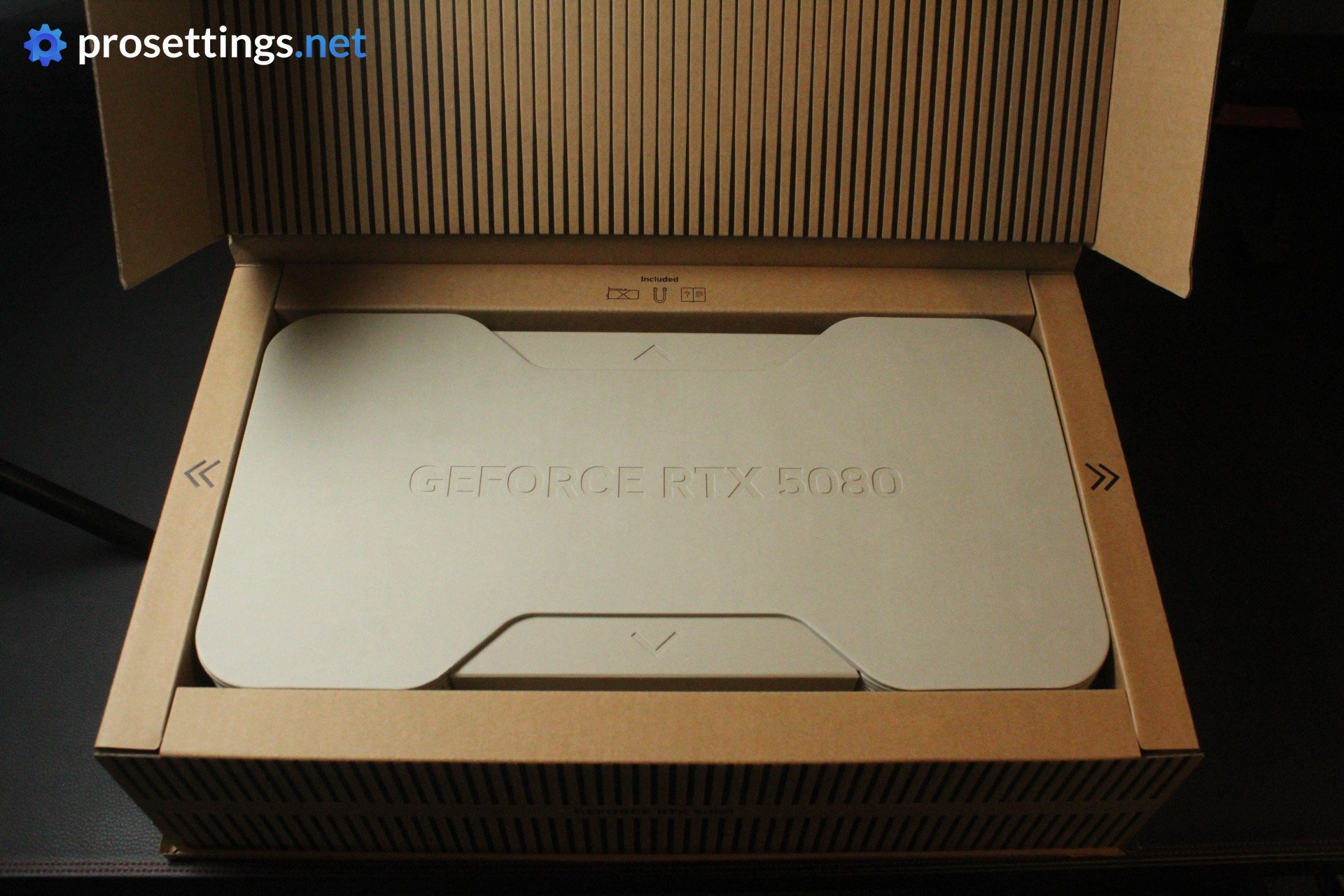
First, I have to mention that the unboxing experience is amazing. The designers and engineers have done a fantastic job here, and that deserves a shoutout. The GPU comes in a large, but extremely sturdy cardboard box, and opening up said box feels super smooth and premium. I also like the complete lack of plastic. NVIDIA has managed to create packaging that’s very tough and beautiful while only using cardboard. Impressive.
On to the GPU then, and it’s good to know that you’ll need a 12-pin connection, since this is a high-tier GPU. I used a 12VHPWR cable but there’s an adapter in the box as well.
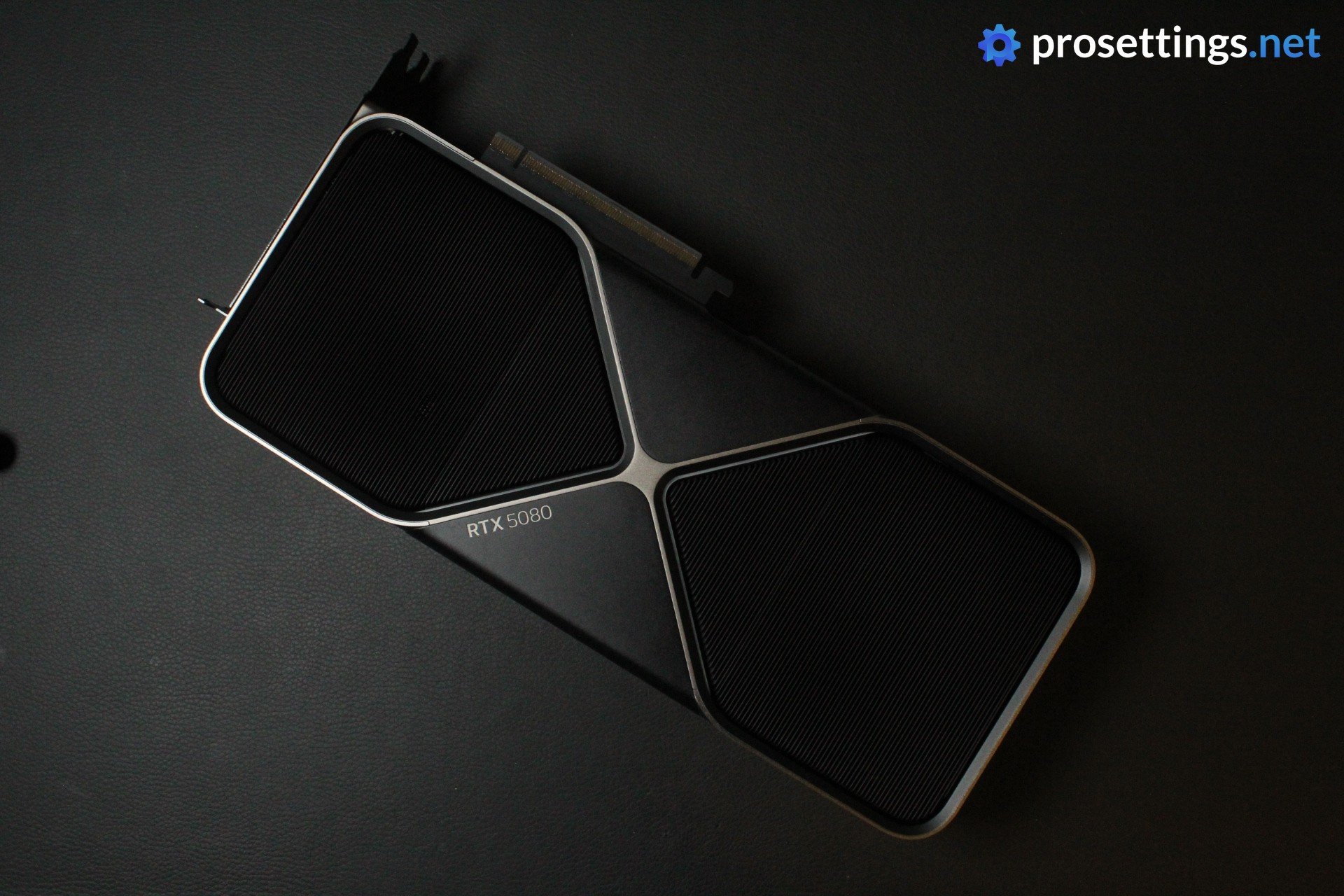
The GPU itself looks great. NVIDIA Founder’s Edition cards haven’t really been looking overly ‘gamery’ for a long time now, and that’s the same here. It’s a sleek marriage of silver and black that, to me, looks great. In terms of connectivity, you get three DisplayPort 2.1b ports and one HDMI 2.1b.
One final thing to note before we get further into the review is that the RTX 5080 has a bit of an odd place in NVIDIA’s lineup. It’s less powerful than the RTX 4090 and (obviously) the RTX 5090, but it also costs far less than those flagship cards. At MSRP, the 5080 will set you back $999, while last gen’s 4090 goes for $1,599. The 5090, then, goes for a whopping $1,999. So, it’s good to keep these prices in mind when thinking about the performance of the card.
Testing Method
When testing one of the most powerful graphics cards on the planet, you don’t want to bottleneck it with a subpar CPU. For that reason, we opted to go for the Ryzen 9 9800X3D for the majority of testing. However, we also did not want the testing system to be ridiculously specced and thus unobtainable for a majority of people, so we went with components that are a little bit more ‘achievable’ for most people.
Obviously, an RTX 5080 build is always going to be super high-tier, but we deliberately avoided going with an all top-tier system that’s optimized to squeeze out every last frame. For that reason, we didn’t do any overclocking or in-depth Windows optimization, either. We tested the card so that it would reflect the performance you’d get out of the box if you would just buy a new system and assemble it yourself.
For our testing, we primarily focused on esports games. We tested games at low and high settings at 1080p (the current standard in pro gaming) as well as 1440p. We also benchmarked heavier, more eye candy-focused games to be complete, but those are not the main focus of this review.
This review is mostly aimed at competitive gamers who are considering building a new system and are looking for a GPU to put in their system.
Test System
- NVIDIA GeForce RTX 5080
- Gigabyte B650 Eagle AX
- Noctua NH-D15
- Corsair Vengeance DDR5 16GB
- Corsair 4000D Airflow
- Kingston NV2 1TB
- Corsair RM850x
Other CPUs
The AMD Ryzen 9 9800X3D is a top-of-the-line CPU, so naturally you can expect great performances from a rig like our testing PC. However, we also know that many gamers will use slightly lower-tier CPUs as a means of saving money. While we absolutely don’t recommend going for a budget CPU if you’re considering a card like this (you’d be bottlenecking your PC extremely hard), we also did some testing with other CPUs.
With the Ryzen 7 7800X3D at 1080p, you can expect around 15% lower framerates in CPU-intensive games like CS2. Most games show a lower difference, though, with around a 5-10% difference on average.
We also tested the Intel i7 14700KF, and that was around 15-25% lower in terms of framerates at 1080p.
At 1440p, where GPUs become more important for producing frames, the differences shrink, with the 7800X3D sometimes matching the 9800X3D. The 14700KF ending up being around 5-10% slower.
As noted, this is just a (really) rough indication of what to expect at different CPU levels, but it might be handy to keep in mind if you’re considering the RTX 5080 as an upgrade for your current PC.
Esports Performance
CS2
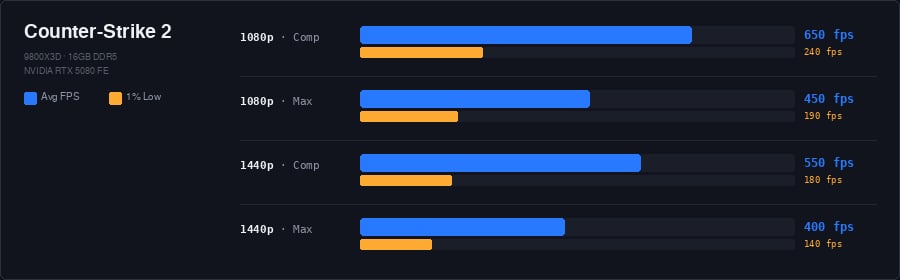
CS2 is a notoriously demanding game these days. It’s quite easy to get high framerates in this game, but frames can drop quickly when there’s lots of smokes and molotovs on the screen.
As you can see, the 5080 is an excellent card for even the highest refresh rate monitors, but it should be noted that CS2 is quite CPU-heavy. As such, if CS2 is your main game of choice, you can absolutely go for an older or lower tier card and invest the savings into getting a great CPU, as that’s where you’ll get most of your gains.
If you’re someone with a 1440p monitor and you want to play on high settings, the 5080 does shine brighter, especially if you have a high refresh rate monitor.
VALORANT
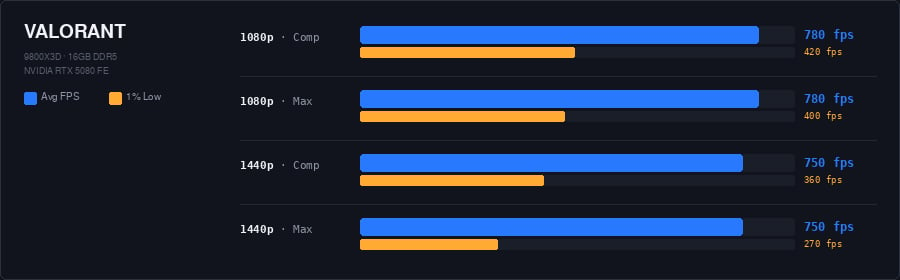
VALORANT is incredibly well-optimized, as you can see in the results above. The RTX 5080 can be looked at as an ‘overkill card’ if you’re only buying it for VALORANT. The average frames per second greatly exceed what even the fastest esports-ready displays can achieve, and even the 1% lows reliably stay above 360 frames per second. Given how 360Hz monitors are the current standard, that means that you’ll never be dipping below that point, unless you’re playing on 1440p at high settings.
Overwatch
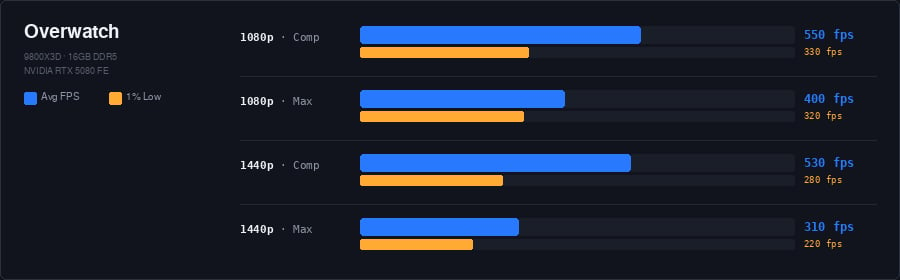
Overwatch 2 sits somewhere in between the ultra lightweight games like VALORANT and the heavier games on our list. At 1080p with competitive settings, the RTX 5080 pushes 550 frames per second with 1% lows at 330, which is more than enough for any monitor on the market right now. What’s interesting here is that the 1% lows between competitive and high settings at 1080p are almost identical, meaning that you can quite easily bump the fidelity up a bit if you’re rocking a 240Hz monitor.
Settings start to matter a bit more at 1440p. Dropping from low to high settings cuts your average from 530 to 310 fps, and the 1% lows go from 280 down to 220. That’s still perfectly playable on a high refresh rate monitor, but it does show that Overwatch 2 can put some real load on a GPU when you crank up the visuals at higher resolutions.
Fortnite
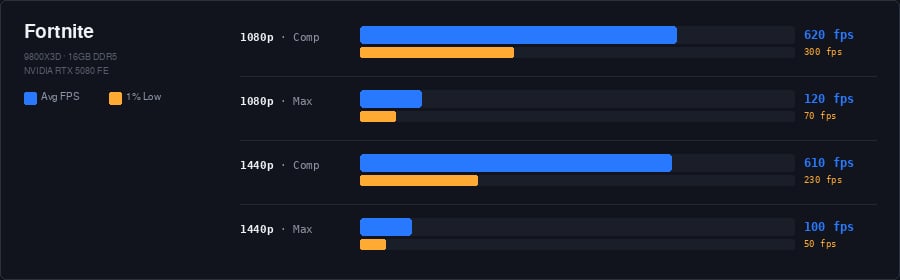
Fortnite is a game of extremes when it comes to performance. Epic has been implementing state-of-the-art rendering technology into the game, and the difference between competitive settings and max settings is staggering. At 1080p, we’re looking at 620 fps on competitive settings versus 120 fps with everything maxed out. That’s more than a 5x difference just from settings alone, and it gets even more dramatic at 1440p, where max settings push the card down to just 100 fps average with 1% lows of 50.
Of course, no competitive Fortnite player is going to be using max settings. On competitive settings, the RTX 5080 absolutely rocks this game, with even 1440p still producing over 600 fps on average. If you want a middle ground between competitive and max, there’s plenty of room to bump up some visual settings and still comfortably stay above 240 fps in Fortnite.
PUBG
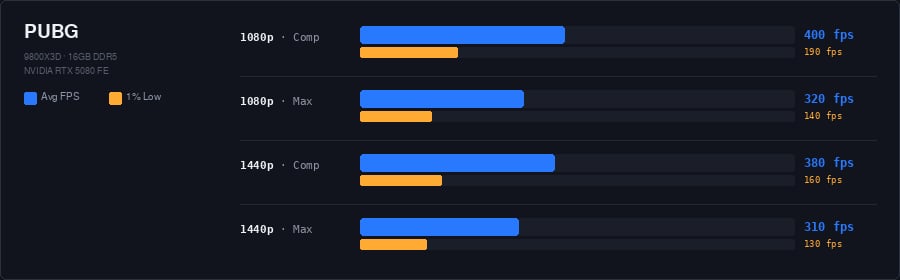
PUBG has always been one of the rougher competitive games to run, but modern GPUs do handle the game quite well. With 400 fps at 1080p competitive settings and 380 fps at 1440p, you’re a lot better off in terms of framerates than you were a couple of years ago.
Still, PUBG remains a resource-heavy game, and we see that in the lows. At 1440p, the 1% lows sit around 130-160 fps regardless of whether you’re on competitive or max settings, so those are numbers you’ll notice if you’re on a 240Hz screen.
With that said, the averages are more than high enough for most gaming monitors out there, and the card handles 1440p at max settings comfortably with a 310 fps average. If PUBG is your main game, getting a GPU like this one can do wonders for your performance, especially if you’re rocking a GPU that’s a couple of generations old.
Apex Legends
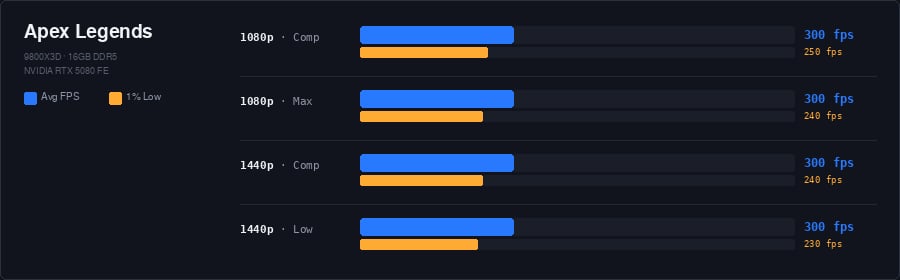
Apex Legends has a hard framerate cap of 300 fps, and the RTX 5080 hits that cap in every single scenario we tested. Whether you’re on 1080p or 1440p, competitive or max settings, the card sits at 300 fps with 1% lows between 230 and 250. It’s remarkably consistent.
If Apex is your primary game, the RTX 5080 is overkill. You’d get an identical experience with a lower-tier GPU, since the engine’s framerate cap is the limiting factor here and not the hardware.
Rainbow Six Siege
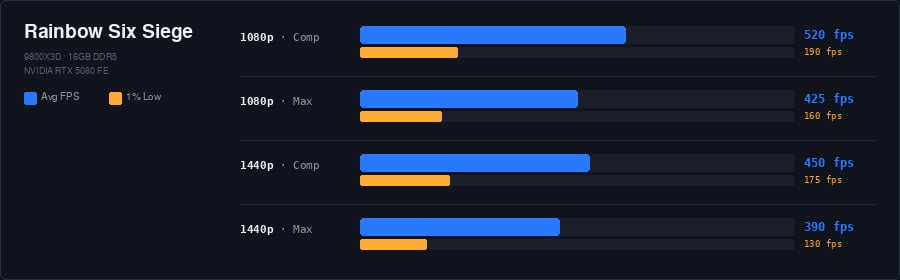
Rainbow Six Siege used to be a pretty heavy game to run, but the RTX 5080 handles it with ease. At 1080p with competitive settings, you’re looking at 520 fps, dropping to 425 fps on high settings. At 1440p, the numbers are 450 fps and 390 fps respectively.
The 1% lows range from 130 to 190 fps depending on the resolution and settings. These dips are mostly caused by destruction events like walls being blown open or cluster charges going off, which is par for the course in Siege. Even in the worst-case scenarios, you’re still comfortably above 120 fps, so high refresh rate gameplay feels quite smooth and consistent.
Esports Performance – Summary
As you can see from the data, the NVIDIA GeForce RTX 5080 is an extremely powerful card that is, as a dedicated esports GPU, overkill for the majority of games that we analyze. Unless you’re a power user who wants to squeeze every last frame out of a very high-tier gaming setup with a state-of-the-art high refresh rate gaming monitor, you’re probably better off going for something like the RTX 5070 or even the RTX 5060 if you’re playing less demanding games.
If you’re a 1440p gamer at higher refresh rates (240Hz and up), things change a bit. Some of the heavier games that we analyze would absolutely benefit from a card like the RTX 5080, though it needs to be said that you need a beefy CPU to achieve those higher framerates. A top-tier GPU like the RTX 5080 won’t cut it if it’s coupled with a low-tier CPU.
Of course, dedicated competitive gamers will always want as much performance as they can get, which is the reason why we often see the top-end models float to the top of our most-used charts in the pro scene. With gaming monitors offering higher and higher framerates and 1440p esports-ready displays on the market right now, the 5080 is the logical choice if you want to experience some of the best performances on offer right now without paying up for the much more expensive RTX 5090.
Performance – AAA Games
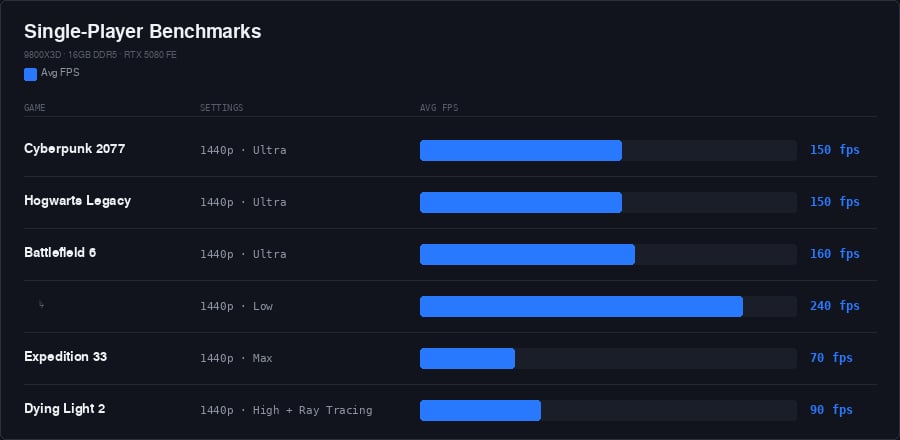
In single player games with maxed out graphics, GPUs start to matter a lot more. And, logically speaking, most people who buy a GPU like the RTX 5080 will also want to put it through its paces in more graphically demanding games. Even though this is not the goal of this review, we did benchmark it in some of today’s favorite games.
Given how these games are about ‘eye candy’ and not necessarily about maximizing for competitive performance, we chose to benchmark them at 1440p. The results are quite satisfying, as you can see. Even Battlefield 6, which can get incredibly demanding when tons of players and objects are causing explosions and projectiles to fly across the screen, lands at 160 frames per second. Go for some more competitive settings, and you can even saturate a 1440p 240Hz monitor.
It’s in games like these where GPUs like the RTX 5080 really start to shine, so if you’re looking for a GPU that can run today’s latest without any issues and give you pro-tier framerates in competitive games, this is a great option.
Noise and Heat
The RTX 5080 is a beefy graphics card, so you shouldn’t expect it to run at whisper-quiet levels. With that said, we found the noise levels of the fans to be very acceptable. Unless you have a super airy case that’s sitting in your immediate vicinity, the card won’t be overly noisy even when gaming. There is some coil whine at higher framerates, however. Depending on your tolerance for this kind of high-pitched sound, this might get annoying.
Aside from that, the RTX 5080 is quite average when it comes to its overall noise levels. It’s not extremely quiet, but it’s also not noticeably loud or obnoxious.
In terms of thermals, we registered between 65-70°C during load. In idle mode (when doing some browsing or office work) it sat at around 40°C. These are respectable temps and not something we would consider out of the ordinary.
Conclusion
The NVIDIA GeForce RTX 5080 is an impressive graphics card. In terms of pricing, it offers quite a good deal (at MSRP and in today’s pricing market, that is) for players who want to maximize their framerates in competitive games, but do note that it’s going to be overkill for more casual players at 1080p. If you mostly play competitive games and you’re buying a GPU for that, we’d recommend the 5070 or 5060, as those will allow you to save some money.
If you’re someone who’s gaming at 1440p, though, it becomes a more logical option. At that resolution, games become more GPU-driven, so there are more benefits to gain from going with an extremely powerful GPU like this one.
Whether the performance of this card is worth the price of admission is a question everyone will have to answer for themselves, but we liked our experience with this card. It’s beautifully packaged, runs at very respectable noise and heat levels, and delivers fantastic performances in all of our analyzed games for even the most high-tier displays.
This product was received for free from the manufacturer and given to our reviewer to test and review. Brands and manufacturers have no editorial control over our reviews. For more information, check out our review FAQ.
Former semi-pro gamer turned writer, product reviewer, and community manager.

