Introduction
Logitech keyboards have always been a staple in the pro scene, but due to the fact that the company was a little late to the analog switches party, their market share in the pro scene dropped a bit during the early years of analog boards in favor of other brands. The G Pro X TKL RAPID keyboard changed that (it’s the fifth most-used keyboard on the website at the time of writing), and now the successor of that board is here to solidify Logitech’s position in the analog gaming keyboard scene. Complete with an OLED display, refined acoustics, and an included wrist rest, this should be a fantastic option on paper. Read our full Logitech G Pro X2 RAPID review to find out if it also delivers in practice.
At A Glance
Logitech G Pro X2 RAPID
Used by 10 players ()The Logitech G Pro X2 RAPID is a bit of a frustrating release. On the one hand, it’s a huge victory over the vast majority of its peers, since it sounds miles better than what other big brands are offering right now. On the other hand, it’s held back by offering a comparatively limited amount of in-depth customization options.
Pros
- Excellent sound and typing feel
- Very smooth switches
- Good build quality
- Included wrist rest feels decent
Cons
- Bulky, high case has rather sharp edges, which can be uncomfortable without the wrist rest
- Customization isn’t as deep as on competing flagship analog boards
- Still no web driver
Specs
| Form Factor | TKL |
|---|
| Switches | Logitech High Profile Linear |
|---|
| PCB | Hotswappable |
|---|
| RGB | Yes |
|---|
| Height | 3.8 |
|---|
| Width | 36.3 |
|---|
| Length | 14.3 |
|---|
First Impressions
Keyboard
Whenever I unbox a keyboard, pretty much the first thing I do is type on the board to see how it feels and sounds. Usually, with mass-produced gaming keyboards from the big brands, my reactions vary from ‘eh’ to ‘quite good’, but here I was honestly very surprised. I’ll go into more detail on this aspect further down in the review, but suffice it to say that I’m very impressed.
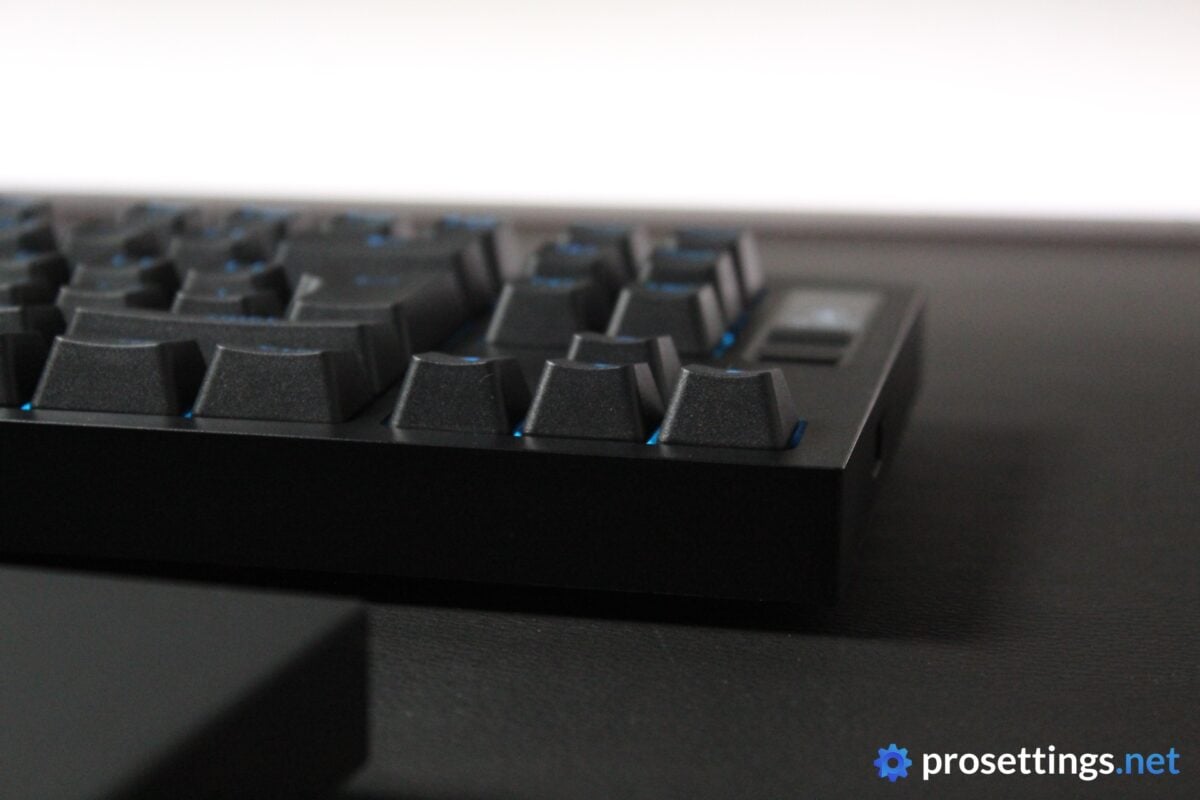
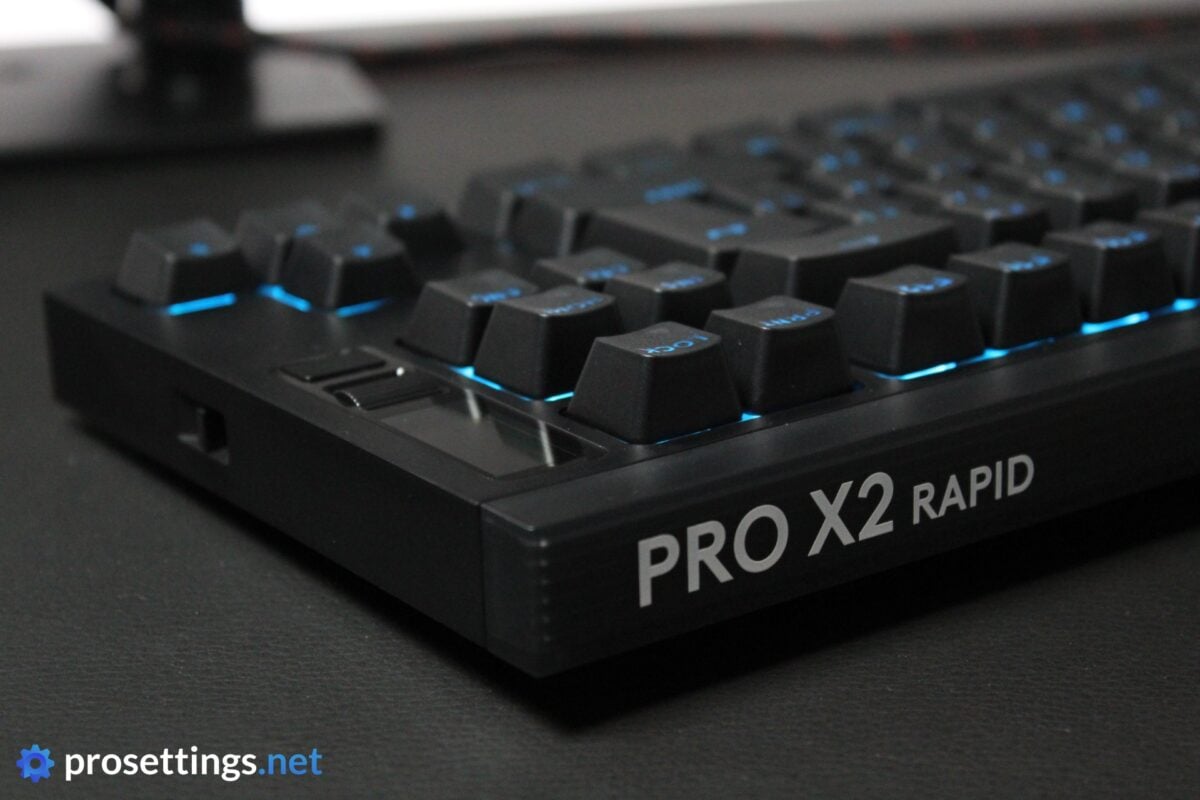
One other thing I noticed quite quickly was the overall size of the board. It seems like other brands are trying to focus on being compact these days, but the G Pro X2 RAPID is quite the unit. It’s not that heavy, but the case is quite big, with sharp corners and high, sharp edges. It’s quite the departure from the rounded, more compact design style that’s trendy these days. Perhaps that’s why Logitech has included a wrist rest with this board, but if you’re using it without one and you come from smaller-feeling boards, you’ll probably need some time to get used to this.

RGB
As with the vast majority of gaming keyboards, you’re getting RGB here. This is a black keyboard, however, and the backplate is also black. What this means is that you’re not going to get a super bright or glowing RGB show, like you would with boards with a white backplate. This very keyboard can be bought in white, though, so if you’re a big RGB fan, you could consider that one.
The RGB itself is very decent. Some keycaps don’t let light through completely evenly, which makes the whole thing look a bit less clean, but the actual light is nicely saturated and consistent, and individual effects also transition and react without any glitches or hiccups.
It’s not the board to get if you’re really into RGB due to the way it’s been designed, but it doesn’t disappoint either.
Packaging
Inside the box of the Logitech G Pro X2 RAPID, you will find:
- The keyboard itself
- A USB-to-USB-C cable
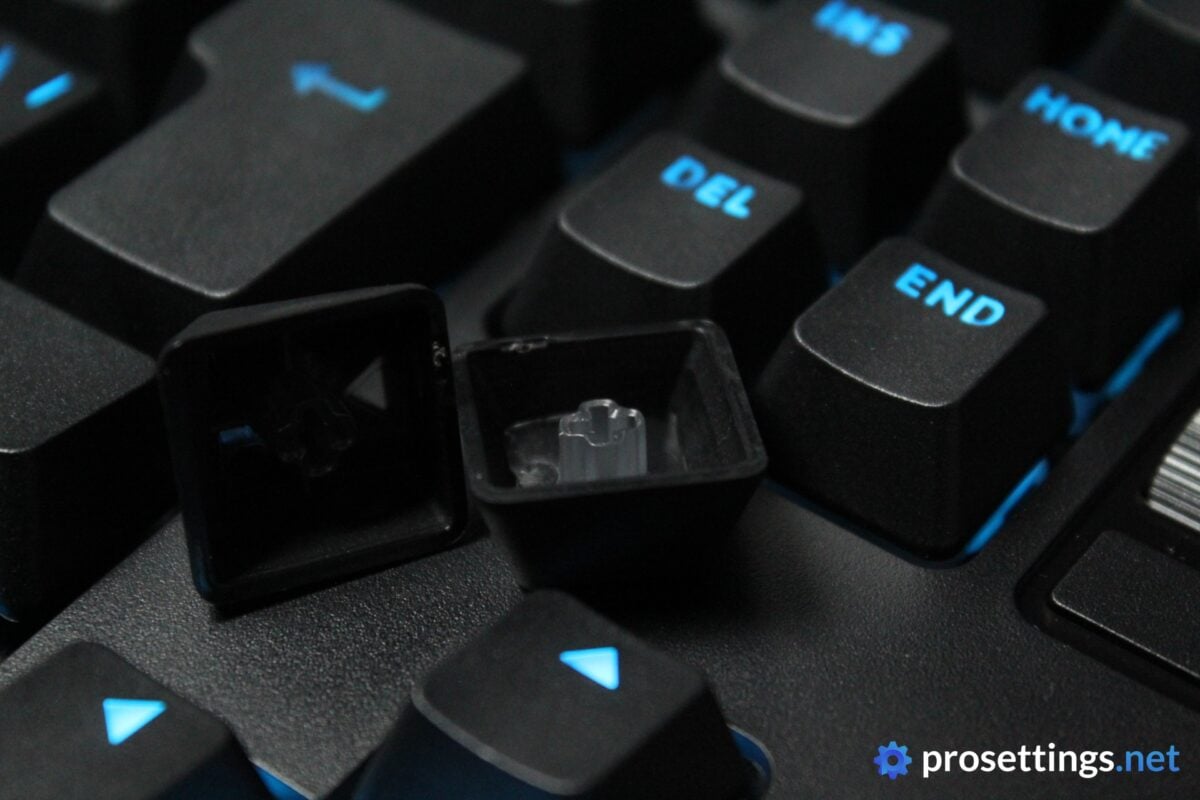
- A keycap/switch puller combo
- Replacement keycaps (Esc, Pause/Break, PgUp, PgDn)
- A silicone wrist rest
- User documentation
That’s mostly fine with me, but given the MSRP of $229.99, I would’ve liked to see a replacement switch or three in the box.
Features and Build Quality
Materials and Design
The Logitech G Pro X2 RAPID has a full plastic case. It has a matte finish to it that’s quite good at warding off fingerprints and smudges, making the board look quite ‘tactical’ in real life. The quite sharp angles also make it look visually distinct from a lot of its peers. In a way, the board looks almost brutalist to me.
I don’t mind the aesthetic, but I do wish that the case was a bit less bulky. I know that there’s a wrist rest included, but if you are someone who prefers playing without one, the board can feel quite ‘high’ when using it. I’m not sure if this is due to the sharper edges or because of the actual case height, but I do know that the board sometimes felt slightly uncomfortable to me during extended sessions.
In terms of build quality, it feels fine. Despite being completely made out of plastic, I can’t get the case to bend or flex in any meaningful way when I’m holding the board with two hands. On top of that, there’s no case flex or unwanted PCB flex when typing and gaming.
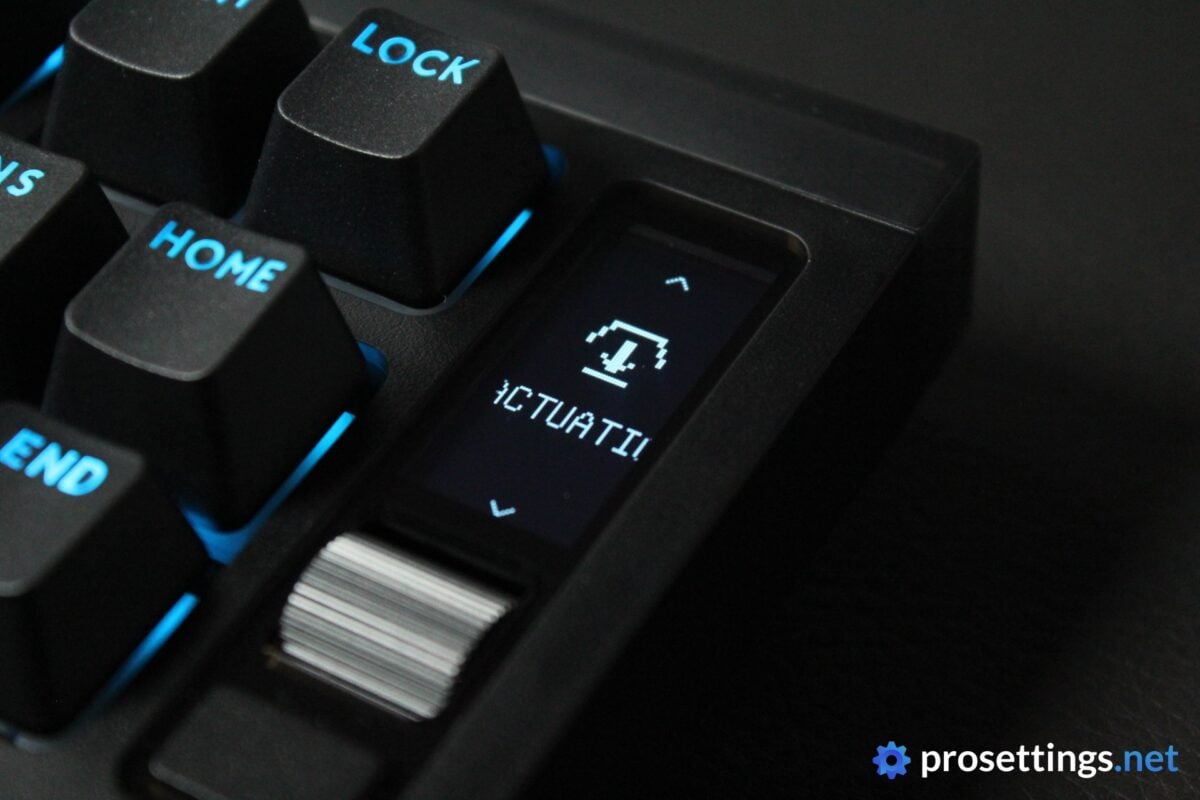
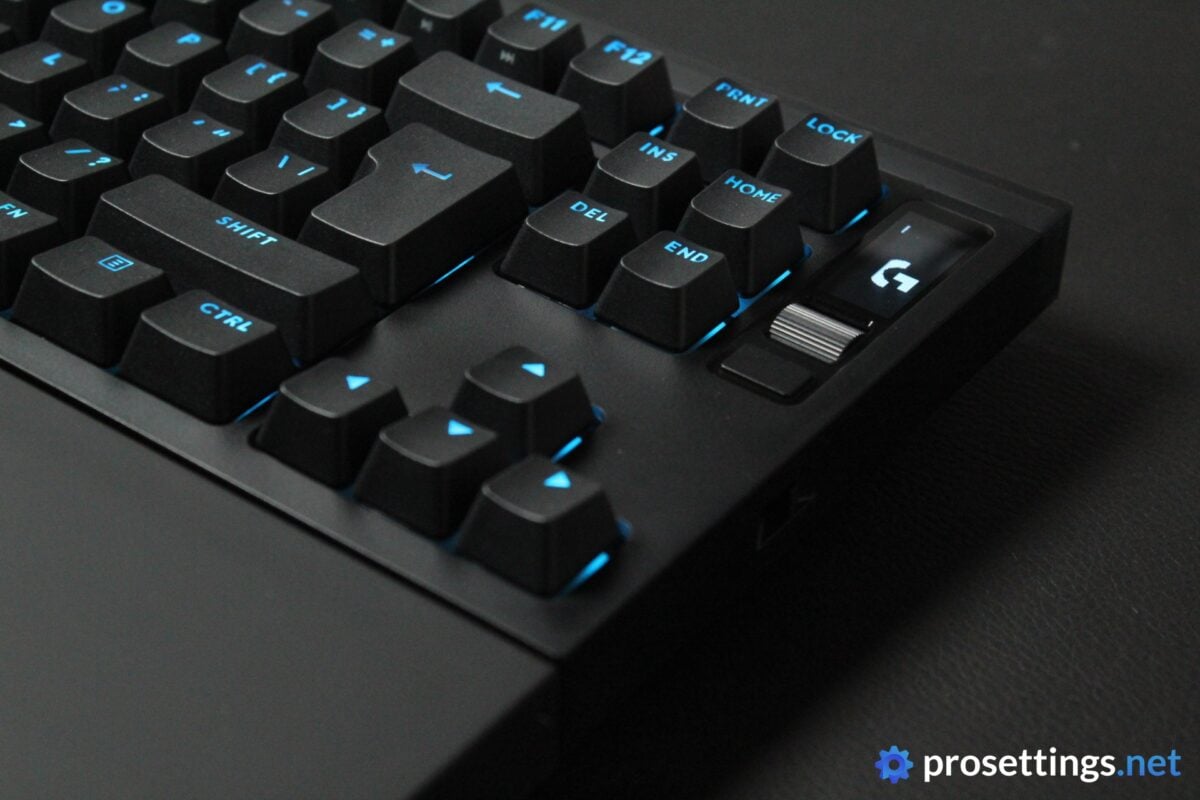
On the top right, you get a small OLED screen, complete with a control wheel that you can press down, and an extra button. Back in the days of mechanical boards, I found screens like these to be quite gimmicky, but now that keyboards have so many ways to customize their behavior, I find them to be a handy addition. It’s a good way to check which profile you’re on, or to quickly change your keyboard’s settings without having to remember a whole bunch of button combination shortcuts.
On the right, there’s a gaming mode switch.
Wrist Rest
If the aforementioned bulky case bothers you, there’s always the included silicone wrist rest. This isn’t the highest-quality wrist rest I’ve ever laid my hands on, but it’s one of the better free included ones on the market at the time of writing.
I like that Logitech hasn’t gone for a simple plastic rest with a microscopically thin layer of some faux leather on top of it. I find those types of wrist rests to be very uncomfortable. This silicone rest has a bit of give to it, which, to me, feels a lot more welcoming over longer periods of time.
The chosen material isn’t the best at hiding smudges, though. So if you’re winding down after a particularly sweaty session, you may want to wipe it with a cloth, otherwise things can start looking quite grimy. But aside from that, I’m quite happy with this wrist rest.
Keycaps
The keycaps are quite heavily textured, which I like. The matte finish does a great job at hiding finger oils and sweat marks, which I also like.
Something that I don’t really like is the font. To me personally, it’s a bit too ‘gamery’ or playful. Additionally, some keys don’t let the light through quite evenly, which looks a bit messy. So in terms of aesthetics, this is not necessarily a set of keycaps I’d keep on the board.
In terms of general quality, these are fine. The underside of the caps has clearly visible dents and residue from the machine cutting them off, but this is not something that you can see when you’re using the keyboard in your day-to-day life, so I can excuse that.
All in all, I have no big objective complaints. This is a decent-to-good set for a mass-produced gaming keyboard.
Customization
Technically speaking, you can configure the board with the OLED screen and accompanying controls, but if you want to do any in-depth or key-specific adjustments, you’ll want to use G HUB.
Sadly, Logitech still does not have a web driver available for their products, which is a real downside to me, as I just simply don’t like G HUB. Some elements are quite confusing for me to find or configure, and it also has a tendency to automatically switch profiles and the like.
Within G HUB, you can create and assign macros, rebind keys, set the actuation point, assign Rapid Trigger, and so on. You can also use pro player presets. All the basic features that 99% of the userbase would ever need are present here, but the customization of specific features isn’t quite as deep here as it is on some other boards. There is, for example, no split sensitivity for Rapid Trigger, nor is there a way to toggle continuous Rapid Trigger.
To be complete, I should say that the aforementioned omissions are going to be unnoticeable for the vast majority of players. Most people simply want to dial in the Rapid Trigger sens, assign some different keys, create some profiles, and call it a day. The board also has SOCD, for example, so all the modern basics are there to get yourself a meaningful and obvious advantage over mechanical boards. But this is a gaming keyboard that’s coming in at flagship prices, so it obviously deserves a mention that the customization is not quite as deep as it could be.
Switches
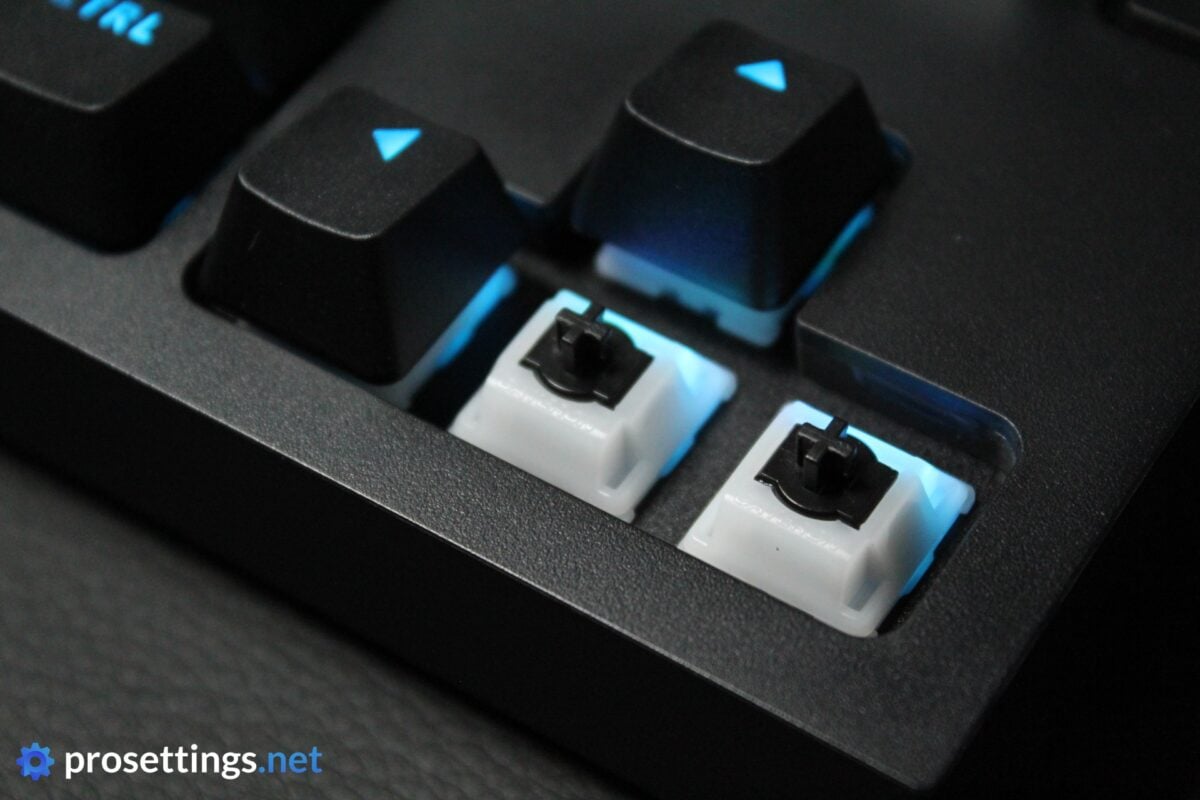
Within the Logitech G Pro X2 RAPID are the Logitech High Profile Analog Linear switches. These POM switches are on the lighter side (they have an actuation force of 30g; around 40g is common in other mainstream boards) so I thought I wouldn’t love them, but I really do. There’s a bit too much stem wobble if I’m being nitpicky, but other than that I am a big fan.
The switches are very smooth all the way across the travel distance (4mm) and have a very pleasing rebound feel. To top it off, they also sound very nice. I don’t know if this is due to the spring rebound qualities or perhaps a certain type of lube that was used, but these switches don’t feel overly sensitive when pressing them. Usually, with these lighter types of switch, I find that they feel too responsive, whereas I prefer a slightly heavier feel when typing and gaming. These, to me, feel pretty much perfect.
I really want to applaud Gateron (they collaborated on these switches and their name is on them) and Logitech here, because these switches are some of my favorite ones I’ve tried in recent years.
Typing and Gaming Experience
Gaming Experience
A good and reliable analog keyboard is always going to perform miles better than a mechanical keyboard for gaming. The advantages are undeniable and very obvious. In that sense, the Logitech G Pro X2 RAPID is an instant upgrade over non-analog boards.
But within the analog world, it’s not playing at the very highest levels. The aforementioned lack of in-depth customization holds it back from being as configurable as some of its peers from other brands, so in theory this keyboard is not as performant as certain other flagship products.
I do say ‘in theory’ because, as I noted earlier, the vast majority of people don’t need in-depth customization. Being able to set Rapid Trigger and your preferred actuation is where most of the benefits of these types of boards lie, and you can absolutely do that here. As such, for gaming, this board delivers the goods, mostly. You probably won’t be held back by it when playing, but Logitech is a huge and important gaming brand, so I would like to see some more features (as well as a web driver) in the future for people who do want and/or need them.
Typing Experience
The Logitech G Pro X2 RAPID is one of the most pleasing mass-produced keyboards to type on that I’ve tried so far. I didn’t quite expect it (usually, the better-sounding boards are made by relatively smaller brands) but the sound and feel is amazing.
Stabilizers feel and sound good, the switches feel very smooth and fun to use, and the keyboard itself quite simply has a super satisfying overall sound signature. There’s also no case ping and none of that overly mechanical sound when using the stabilizers, so what you’re getting here is a very ‘pure’ sound that’s a mix between creamy and thocky.
A lot of brands these days put a ton of foams and rubbers inside their keyboards to improve the sound, but Logitech really seems to have put in the time and effort to get close to an enthusiast-level sound and feel. I love it.
Sound Test
Alternatives
There is no shortage of TKL analog gaming keyboards on the market right now. As such, I won’t be comparing this board to all of the available alternatives (that would be impossible) but rather to the ‘usual suspects’. If you have any questions about how the board fares against other keyboards, don’t hesitate to reach out in the comments.
Logitech G Pro X2 RAPID vs Wooting 80HE(+)
In terms of pure performance, the Wooting 80HE is quite simply better. Whether you’ll notice this in-game is another matter, but there is no denying that you get more customization options with the 80HE. The X2 RAPID does cover all of the basics you’d want out of a modern analog board, however, and its major draw is that it sounds better than the 80HE.
If you’re deciding between these two, I’d thus say that the decision mostly comes down to aesthetics and sound versus performance. Looking for the best performance? Go for the Wooting. If you’re looking for a good mix between top analog functionality and great sound, go for the Logitech.
See our Wooting 80HE review
Logitech G Pro X2 RAPID vs Razer Huntsman V3 Pro TKL
The story here is very similar to the one above. If performance and in-depth customization are your main concerns, go with the Razer Huntsman V3 Pro TKL. If you care a lot about the sound and feel, go for the Logitech G Pro X2 RAPID, as it sounds a lot better than the Huntsman.
See our Razer Huntsman V3 Pro TKL review
Conclusion
The Logitech G Pro X2 RAPID is a bit of a frustrating release. On the one hand, it’s a huge victory over the vast majority of its peers, since it sounds miles better than what other big brands are offering right now. On the other hand, it’s held back by offering a comparatively limited amount of in-depth customization options.
As such, this is a board that deserves some thought rather than a full, no-questions-asked recommendation. If you want to get yourself an analog keyboard to enjoy Rapid Trigger and all the other features that these boards offer and you want your keyboard to sound amazing without having to do any modding yourself, this should be really high on your list.
However, if you’re looking for the highest-performing gaming keyboard, this drops a couple of tiers. There’s this screen for on-the-fly adjustment, which is cool, but Logitech still doesn’t offer a web driver to customize their product. In addition to that, G HUB does not have the in-depth customization that some rival brands do offer.
Whether these are things you’ll notice is another question entirely (most people will be completely fine with the current feature set of this board) but a top-priced gaming keyboard made by one of the industry’s biggest brands should deliver a pretty much complete feature set in my opinion.
All in all, though, this is a pretty exciting release, especially if you’re someone who also uses their gaming keyboard for work.
For the X3 RAPID, I’d love to see a slightly more compact case, along with a web driver and an expanded set of customization options. If Logitech can deliver that and keep the amazing typing feel and sound of the X2, it would compete for most complete option on the market. Today, the X2 is a very nice, but not perfect board. Very respectable, but it could’ve been more.
This product was received for free from the manufacturer and given to our reviewer to test and review. Brands and manufacturers have no editorial control over our reviews. For more information, check out our review FAQ.
Former semi-pro gamer turned writer, product reviewer, and community manager.

