Introduction
Corsair’s flagship Sabre mice come in different finish materials. And, since the release of the V3 Pro, there’s also an ergonomic version available. In our full Corsair Sabre V3 Pro MG Ergo review, we’re taking a look at the magnesium ergonomic version of the brand’s top-end gaming mouse lineup. If you’re interested in the regular symmetrical edition, you can read our full review on that one here.
At A Glance
Corsair Sabre V3 Pro MG Ergo
All in all, the Corsair Sabre V3 Pro MG Ergo is quite a niche product. If you specifically want a magnesium shell and perhaps Corsair’s PureVector tech, this is a no-brainer. But if value-for-money is your main concern, there are better options out there.
Pros
- Very sturdy
- It’s nice to see a big brand offering (non-limited) exotic materials
- Safe ergonomic shape
- Great battery life
- Lots of extras in the box
Cons
- Very expensive
- Quite heavy for a mouse with big holes
- PureVector is underwhelming in its current form
- Huge shell cutouts can interfere with grip consistency
- Some minor QC issues (buttons and scroll wheel)
- Lack of transparency and customization once PureVector is calibrated
Specs
| Sensor | Corsair Marksman X |
|---|
| DPI | 100-42000, in steps of 1 |
|---|
| Polling Rate | 125 / 250 / 500 / 1000 / 2000 / 4000 / 8000 Hz |
|---|
| Button Switches | Optical Switches |
|---|
| Connection | Wireless |
|---|
| Shape | Ergonomic |
|---|
| Length | 11.9 |
|---|
| Height | 4.1 |
|---|
| Weight | 55 |
|---|
| Width | 6.5 |
|---|
First Impressions
Packaging
Inside the box of the Corsair Sabre V3 Pro MG Ergo (which I’ll refer to as just ‘V3 Pro Ergo’ at times in the review) you will find:
- The mouse itself
- The wireless receiver
- Black precut grip tape
- White precut grip tape
- An alcohol pad for the removal of adhesive
- User documentation
- A USB-C-to-USB-A charging cable
- Replacement mouse feet
That’s pretty much everything I expect and need out of a premium gaming mouse. With an MSRP of $199.99, this is obviously one of the most expensive gaming mice you can buy, so I’d expect all of these extras to be included at that price point. For reference: the regular plastic version will set you back $179.99, so there’s a $20 premium for the magnesium materials.
The Mouse
Corsair’s flagship mice are available in three different finishes. You have the regular plastic version, a carbon fiber version, and the magnesium version that I’m reviewing today. The MG version is available in black or white.
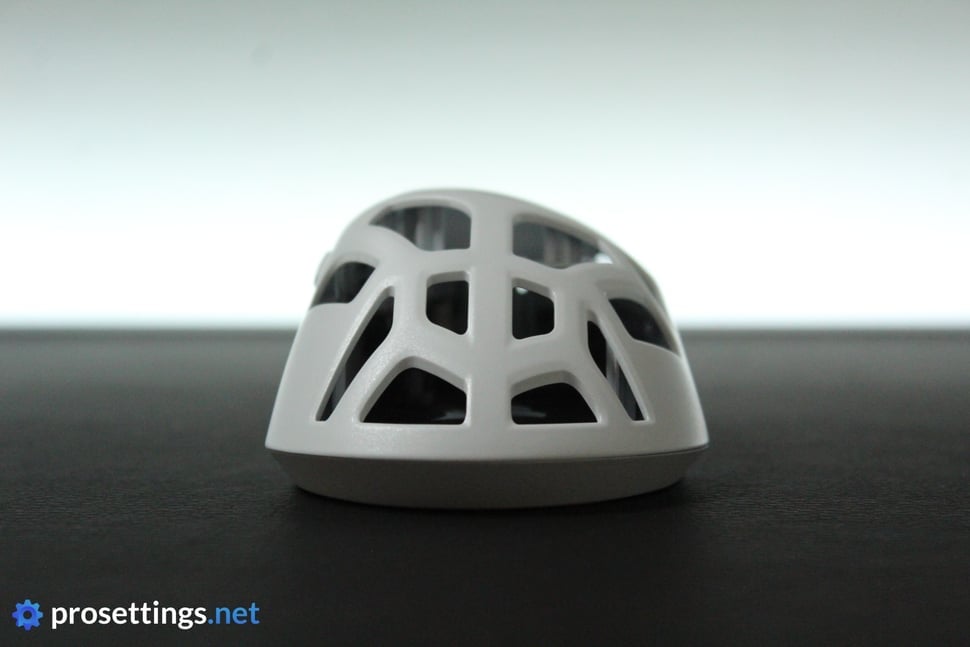
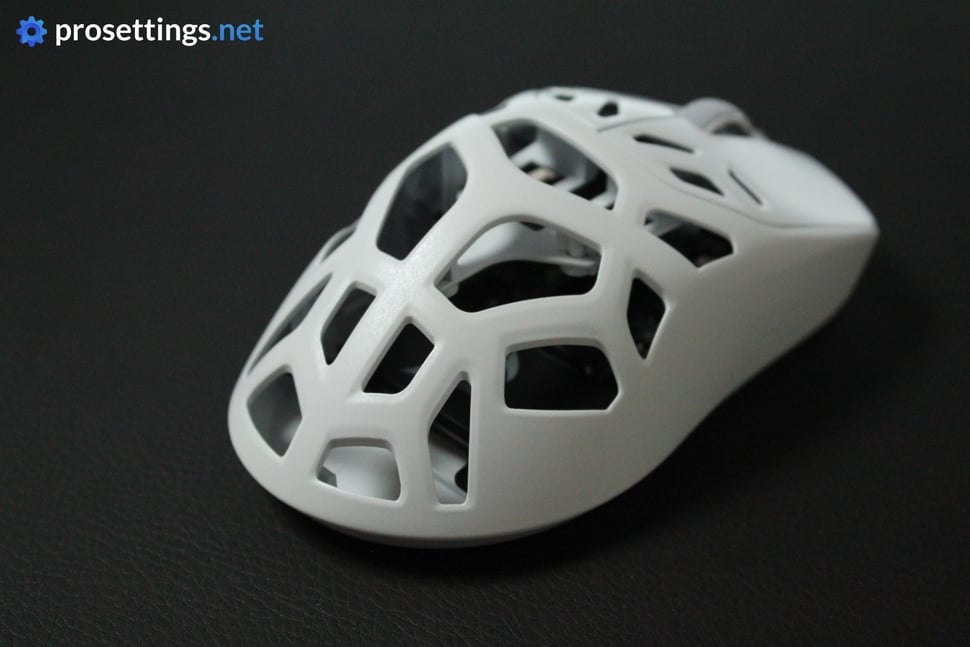
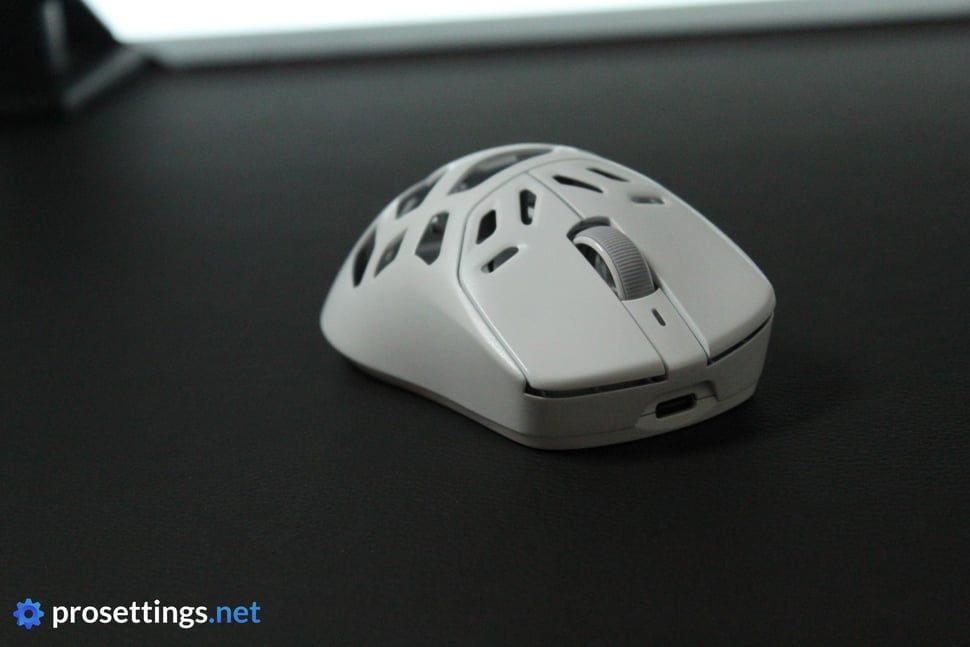
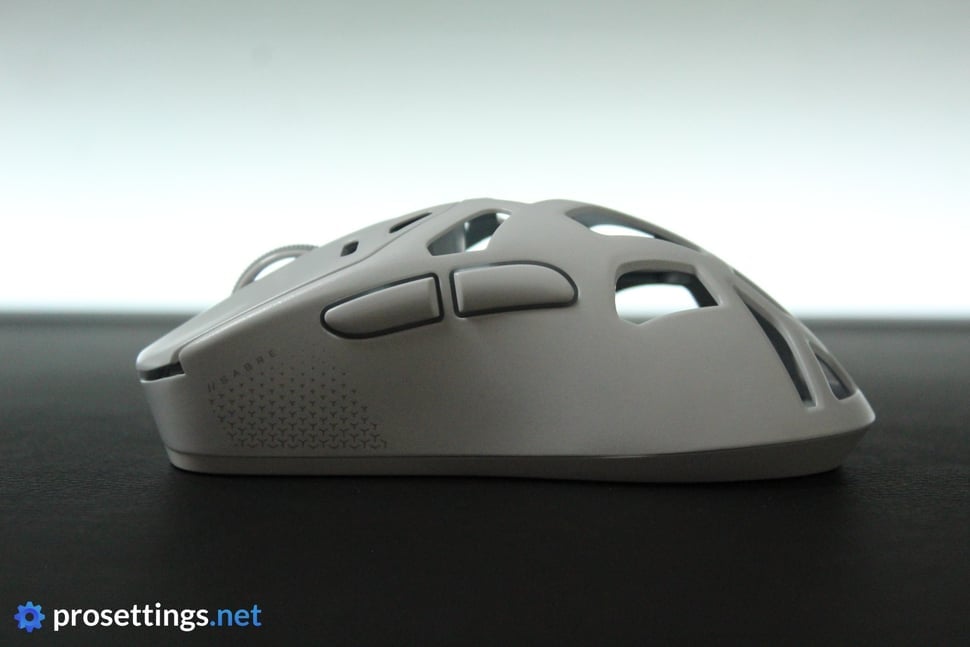
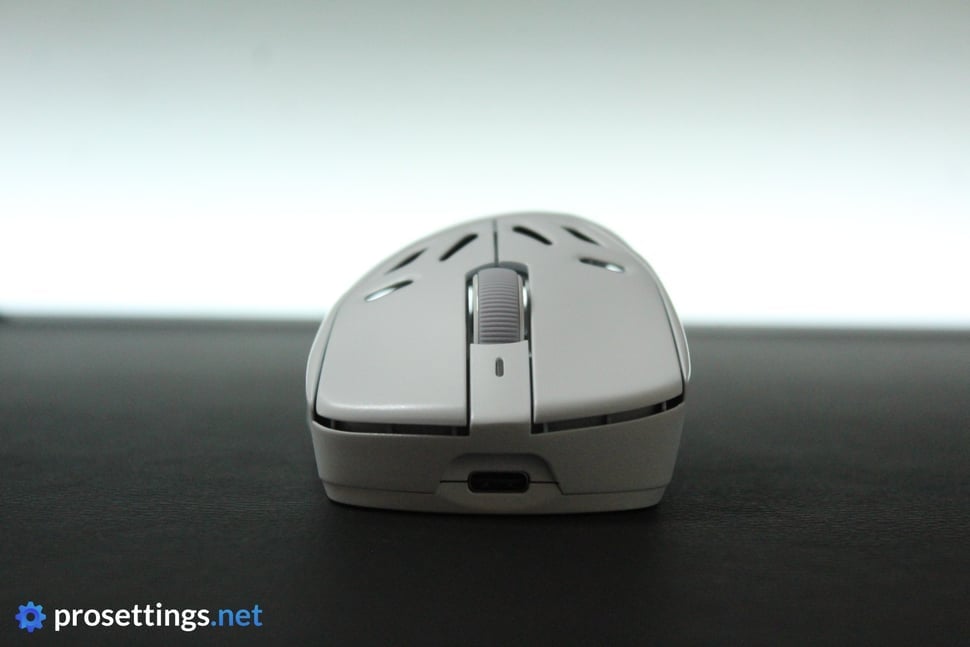
Obviously, the most notable aspect about the mouse is the design. There are huge holes in the shell which you just can’t look past. Whether you like this design or not is personal, of course. I have nothing against gaming mice with holes in the shell, but if they are to be there, I do generally like them to be smaller.
In addition to the design, there’s also the material. You can’t really see that this is a magnesium mouse if you just glance at it, but once you put your hand on it, you immediately get a different feeling than with plastic.
I’ll get more into these aspects further down in the review, but suffice it to say that there’s a lot that catches your eye when you first unbox the Corsair Sabre V3 Pro MG Ergo.
Shape, Coating, and Mouse Feet
My hand size is 18×10.5cm and I use a claw grip.
Shape
The Ergo version of Corsair’s Sabre V3 Pro line is one that plays it rather safe. There are no deep cutouts or ostentatious bumps to be found here; you’re getting a very familiar design that will work well for most fans of ergonomic mice.
The back section moves quite gradually to a centered hump, which then flows forward to the main buttons which have an extremely subtle comfort groove in them. On the front sides, there’s a minor overhang to help with picking the mouse up, and the tilted design (which is typical of ergo mice) makes it so that your hand is in a very neutral position when holding the mouse. Combine all of that with a thumb indentation that’s a little bit more curved than what you usually see and you’ve got a mouse that feels very comfy in the hands.
In terms of comparisons, I’d say it offers a similar sensation to what you get with mice like the ZOWIE EC2 and the Razer Deathadder V4, though the Sabre V3 Pro is a bit smaller than both of those and feels slightly more curved in the middle and towards the front due to the lower button height.
All in all, I think this is a safe, but well-executed shape, but there’s a ‘but’. The huge cutouts do alter the in-hand feeling somewhat, and I don’t like that. The way I hold the mouse, I sometimes get the feeling like part of my palm/hand sinks into the shell, which makes my grip feel a bit less secure. This will be different from person to person of course (I didn’t have this issue on the ambidextrous MG, so it depends on how you grip the mouse) but that’s a big reason why I don’t like these very large cutouts; they mess with the consistency of the shell.
Coating / Material
The magnesium alloy shell is very interesting to me. Contrary to what you might initially think, the shell is actually very grippy due to a very light amount of texturing that can be found all over the shell. So in terms of performance, the material feels very good.
What I also like is the fact that this actually feels different in your hand. Carbon fiber mice, as cool as they are, end up feeling pretty much the same as plastic in my opinion, but magnesium offers a different experience. To me, it feels like it remains cooler to the touch than plastic, and it (obviously) has a more metallic and denser feeling to it. The difference isn’t huge once you get gaming, but it’s enough to notice.
The coating on my white version does a good job at staying clean. Even after sweaty sessions, there’s not really any sweat or oil buildup, so it’s not a mouse you have to clean after every session. Still, it’s absolutely not a mouse for neat freaks. The huge holes obviously let a lot of debris through, and with the white shell you will absolutely start noticing hairs, dust particles, and the like inside the shell. If you’re sensitive to that kind of thing, skip this mouse.
In summary, I’d say that it’s cool to see a mainstream brand release a mouse like this. Magnesium won’t be for everyone (it’s good that there’s also a regular plastic version) but it’s an option worth considering if you want to try something new, or you find regular, full plastic shells to overheat too quickly.
Mouse Feet
The mouse feet feel good. They are slightly on the slower end of the spectrum compared to other mass-produced mice but they’re not overly murky, so I’d say that these will be fine for the majority of users. If you’re buying this mouse because you want a super slick, super speedy experience, you will want to look into aftermarket feet, though.
Recommended Grip Types
I’d say this mouse works perfectly well for both palm and claw grip. It’s an ergonomic mouse with a centered hump, so I wouldn’t recommend it to fingertip grippers, but obviously everyone has different preferences. So please consider this section as a guideline, rather than a strict rule.
Buttons and Scroll Wheel
Buttons
Under the main buttons, you’ll find optical switches. And these feel quite good to me. They’re decently snappy, though the right button feels noticeably mushier than the left button on my unit. All in all, though, I’d say these are fine. They’re not the most tactile-feeling optical switches on the market, but they will work for most people who aren’t mouse switch connoisseurs.
The implementation is a mixed bag. There’s slightly too much post-travel on the left button, though it’s not enough to bother me in-game. What does bother me slightly is that there’s a bit of switch grinding on the left button, too. I don’t get it every time, but depending on where I press it, I can feel a bit of grinding when I’m holding down the left button and moving the mouse, like when I’m spraying or tracking a target. It’s not super pronounced, so it’s not enough to ruin my day when I’m gaming, but it is something I notice when using the mouse normally, so there is some tightening up to do in terms of QC, I’d say.
Scroll Wheel
The scroll wheel has quite pronounced steps. It is pretty much whisper-quiet, though, so I really like that combination. If you’re someone who also uses their mouse for work that involves a lot of scrolling, you may want to take note, as I imagine the tension of the wheel could get annoying after a while.
However, it’s still a gaming mouse, and for gaming, the wheel is great. It’s easy to stop at the right step if you use your wheel for weapon or spell selection. Clicking the wheel also feels good. The required tension isn’t so high that you might accidentally scroll as you’re trying to click it, and it’s also not so light that you click while scrolling.
One thing I will say is that the wheel feels a bit loose in the shell. There’s quite some side play if I push my finger against it, and if I push it horizontally from the left side, I can get the wheel to click. Granted, there’s no real-life situation in which I would ever need to press a two-way-scroll wheel horizontally, but it is a QC issue that should be mentioned in a review.

Side Buttons
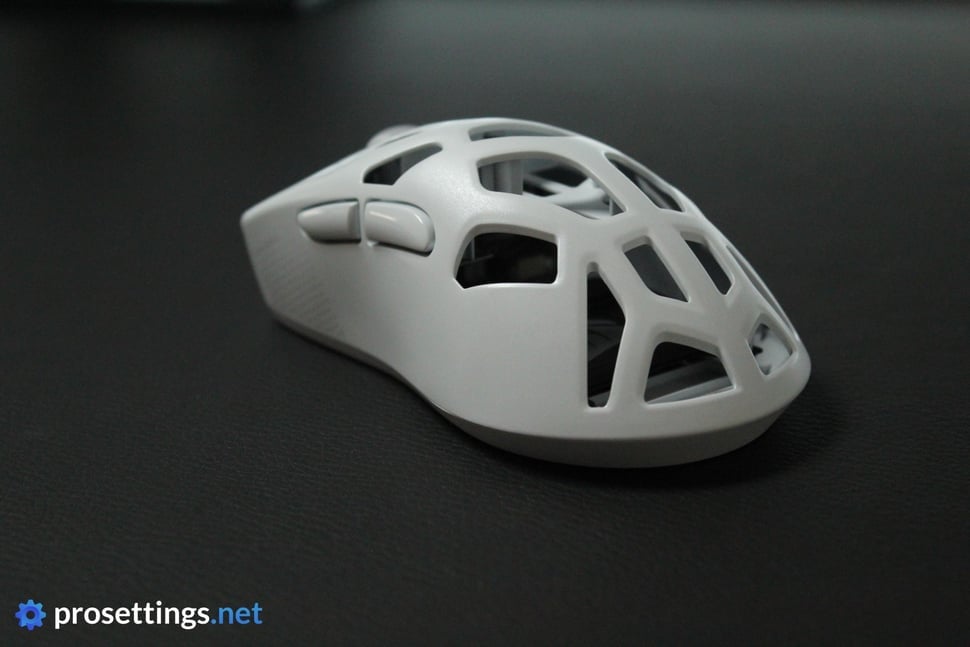
There’s a little bit too much post-travel on both side buttons, but in general I would say these are quite good. The click itself feels quite crispy and tactile, pre-travel is limited to well within acceptable margins, and both buttons are also easy to distinguish by feel alone.
Build Quality
There are two aspects to the build quality of this mouse. There’s the shell and overall construction of that, and then there’s the implementation of things like the buttons and so on.
As I already mentioned, the mouse has some quality control/build quality issues. They’re not enough to spoil my experience, but I do expect better from a $199.99 mouse. At that price, you shouldn’t be getting a scroll wheel that feels a bit loose, nor a switch that grinds when you hold a button, even if both issues are not that egregious.
The actual shell feels amazing, though. Despite the relatively light weight of 55 grams, this mouse is built like an absolute tank. The shell does not flex at any point, and the whole mouse itself simply feels robust and reliable.
One obvious thing I should mention: despite the very sturdy shell, I’d still be very careful when transporting the mouse. If you throw it into your LAN bag along with a bunch of pointier objects such as keys, keycap pullers, detached headset mics, or what have you, these objects could dig into the shell and get to the PCB if they move around within your bag in an unfortunate way. That’s not a flaw of the mouse, it’s just inherent to this type of design with the big holes, so I’d definitely recommend using the box when you’re on the move with this one.
PureVector
What Is It?
Corsair’s Sabre V3 Pro mice come with PureVector. This is basically a personalized sensitivity profile that has been co-created with Aimlabs. I did a full writeup on my experience with this system in my review of the regular V3 Pro (click here to read that) but in short: I am, sadly, not very impressed.
I do get the idea: everyone has an inherent aiming bias (some people tend to always underflick when they need to flick to the left, for example), so having a program that can dynamically adjust your DPI so that it matches your bias seems like a huge advantage in theory.
PureVector’s Current Limitations
As I said, I like the idea, and I like innovation. In practice, however, I feel like PureVector is undercooked.
For one, you only get one very specific set of tasks when configuring your own sens: static flickshots. That’s one aspect of aiming for sure, but it’s a very small aspect. Aiming in-game also involves tracking, micro-corrections, and much more. So I find it puzzling that this one, highly specific task, is meant to give a complete analysis on a person’s aiming bias.
Secondly, I don’t like how vague it is. Once you’ve configured your PureVector sens through a series of calibration tasks, it simply says you’re done calibrating, and that’s it. There’s no way to see exactly what DPIs the program chose for each direction, and there’s no way to tweak it, either.
And thirdly, when I configured my PureVector sens, I honestly couldn’t notice an in-game difference. Yes, I got a bit better at static flicking in Aimlabs, but I did not feel as if my aim had improved in actual games.
PureVector – Conclusion
Despite the fact that I don’t see PureVector as an advantage, that doesn’t mean that I am against its inclusion. Since I published my review of the symmetrical V3 Pro, I saw other reviewers and users say that they did notice a difference, while others echoed my concerns. So I think a lot will come down to your own personal situation. Even if it does work for you, though, don’t expect an aimbot. PureVector is similar to mouse acceleration in the sense that it changes the way you aim. It doesn’t aim for you. You’ll still have to practice to get good.
So, even if it doesn’t work for me in its current iteration, I still applaud the idea behind PureVector. This is technology that can be iterated upon, and I can definitely see a future where a more detailed, more advanced version of this becomes something that is a lot more effective for a larger amount of gamers.
PureVector is also completely optional. So if it works for you: great. If it doesn’t, then simply don’t use it.
Sensor and Everyday Performance
Sensor
The Sabre V3 Pro line uses the Marksman X sensor. That’s Corsair’s current flagship sensor and it works great for me. I didn’t notice any errors or flaws that would be perceivable while gaming, so this is for all intents and purposes a flawless sensor implementation, like you find on all top gaming mice of the past years.
I say this in most of my reviews these days, but sensors have been flawless for many years now. Unless a brand messes up with the implementation, it’s very unlikely that you’ll notice a difference between top sensor A and top sensor B. So as a general rule, you shouldn’t get a mouse just because the sensor is better on paper than the sensor that’s in another recent top mouse. Things such as weight and shape are far, far more important.
Weight
The Corsair Sabre V3 Pro MG Ergo comes in at 55 grams. If you look at the design, that’s a bit strange, as you’d perhaps expect a $199.99 mouse with huge holes all over the shell to weigh closer to 40 grams. So while 55 grams definitely isn’t heavy (it’s right in the middle of the current industry standard weight range of 50-60 grams) it does make it a less appealing option if you know that there’s a $179.99 plastic version that comes in at just 41 grams. One important note: the MG does have a better battery than the regular plastic version, which might explain some of the weight discrepancy.
But really, the only reason to get this mouse over the regular plastic version is if you want to get a magnesium mouse because you like the material properties better than plastic or you want a better battery life. Don’t get me wrong: it’s fine that this version exists, of course. It’s always better to have options. But if you’re someone who isn’t necessarily looking for a magnesium mouse and you just want to check out Corsair’s PureVector products, I’d definitely steer you towards the regular version. It has all of the same internal specs.
Configuring the Mouse
Configuring the mouse is done through Corsair’s Web Hub. I like that. It’s easy to use, quite user-friendly, and pretty self-explanatory. In Web Hub, you can change the DPI, rebind buttons, create macros, and so on. For me, web drivers are by far the most elegant solution for configuring gaming products, so I’m happy that Corsair has fully embraced web drivers.
If you want to use PureVector, however, you’ll need to download Aimlabs. That’s a free aim training program that’s available on Steam, but I’m not a huge fan. Aimlabs has become quite bloated over the years. It used to be much cleaner in terms of the UI, but now there are advertisements for collabs everywhere and there’s just an overload of visual stimuli.
Luckily, clicking on the PureVector button within Web Hub takes you straight to the dedicated PureVector page within Aimlabs (if it’s installed) but Aimlabs still asks you to create an account. Even if you play it via Steam, it asks you to log in via an external account. I don’t like that. Sure, you can continue as a guest, but if you’re buying a mouse like this for the PureVector aspect, you’re presumably going to want to track your stats etc. Making an account isn’t the end of the world, but I really don’t get why Aimlabs won’t just let you use your Steam account.
Battery Life
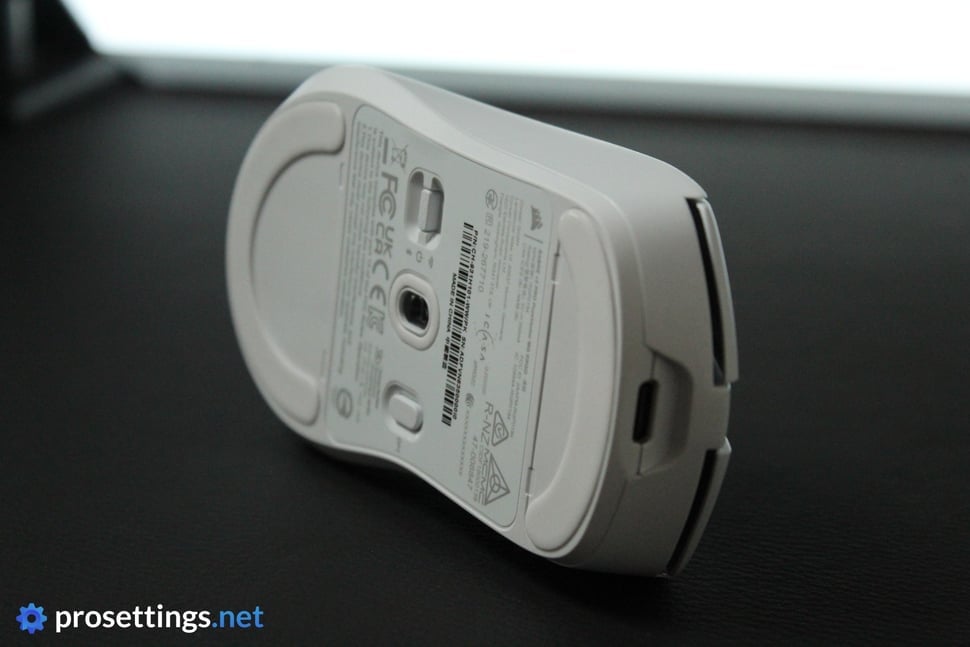
The battery life of the Corsair Sabre V3 Pro MG Ergo is very good. At 1000Hz, you’re getting up to 200 hours. Raise that up to 8000Hz, and you can expect around 31 hours. That’s very respectable, and makes it so that you won’t need to charge this mouse more than once or twice a week, even if you have it set to 8000Hz.
Alternatives
Given how PureVector is one of the defining features of this mouse, I’d say there are no real alternatives. If you’re just looking for a lightweight ergonomic mouse, there are plenty of options on the market, but if PureVector is of importance, you’re basically limited to the other Sabre V3 Pro Ergo options.
The regular plastic version is more affordable and lighter, but has a worse battery. So choosing between these two will come down to what you value more.
Conclusion
The Corsair Sabre V3 Pro MG Ergo is an interesting mouse, but it’s important to contextualize it properly within Corsair’s lineup and the world of gaming mice in general.
As a gaming mouse, there’s tons to like. The shape is safe and comfortable, the magnesium shell feels and performs great, the sensor does its job, and the battery life is excellent. The magnesium shell also feels extremely sturdy, and there’s a noticeably different sensation when you’re holding a magnesium mouse versus a plastic one.
There are issues, though. The huge cutouts aren’t for me, and they don’t seem to do a ton for the weight, either, as the mouse comes in at 55 grams. That’s respectable of course, but you’d expect it to be lighter if you first looked at it. Furthermore, there are also some QC issues on my unit; the implementation of the main buttons and the scroll wheel, for example, isn’t up to par with what you’d expect at this price.
And then there’s PureVector. I like the idea behind it, and I am all for brands trying something new, but the current implementation is quite undercooked for me. It is completely optional though, and I have no doubt that Corsair will keep improving this technology as time goes on, so I am excited to see where this is headed.
In the end, the biggest question is whether you should get this one over the plastic version. For most people, I would say no. The plastic version is cheaper, a lot lighter, and has the same internal specs. The MG version does have better battery life, and the magnesium shell does feel different from plastic, though, so if those things matter to you, then the MG is a great option.
All in all, the Corsair Sabre V3 Pro MG Ergo is quite a niche product. If you specifically want a magnesium shell and perhaps Corsair’s PureVector tech, this is a no-brainer. But if value for money is your main concern, there are better options out there.
This product was received for free from the manufacturer and given to our reviewer to test and review. Brands and manufacturers have no editorial control over our reviews. For more information, check out our review FAQ.
Former semi-pro gamer turned writer, product reviewer, and community manager.

