Introduction
Just like is the case in any competitive game worth its salt, CS2 allows you to tweak your own crosshair. This means that you can change its color, its size, its thickness, and even its behavior. In case you’re interested, you can check out our detailed guide on CS2 crosshairs, but in this article we’ll list the top CS2 crosshair codes of today’s most popular players.
If you want to test out these crosshairs in your browser or you want to tweak your own crosshair without having to boot the actual game, feel free to use our CS2 Crosshair Generator. You can also read our article on how to copy CS2 crosshairs if you’re interested.
These crosshairs are always updated. Whenever a crosshair in our database gets updated, you’ll see that change reflected here so that you’re always certain to have the latest version.
donk
donk burst onto the professional scene as a teenager and rapidly established himself as one of the most explosive riflers in the game. His lightning-fast reactions, aggressive peek-heavy style, and ability to single-handedly take over rounds have made him one of the most feared and respected aimers in competitive Counter-Strike.
| Style | Classic Static |
|---|
| Follow Recoil | No |
|---|
| Dot | No |
|---|
| Length | 1 |
|---|
| Thickness | 1 |
|---|
| Gap | -4.5 |
|---|
| Outline | No |
|---|
| Outlinethickness | 1 |
|---|
| Color | Cyan |
|---|
| Red | 0 |
|---|
| Green | 255 |
|---|
| Blue | 0 |
|---|
| Alpha | No |
|---|
| Alpha Value | 255 |
|---|
| T Style | No |
|---|
| Deployed Weapon Gap | No |
|---|
| Split Distance | 3 |
|---|
| Fixed Gap | 3 |
|---|
| Inner Split Alpha | 0.1 |
|---|
| Outer Split Alpha | 1 |
|---|
| Split Size Ratio | 1 |
|---|
| Sniper Width | 0 |
|---|
ZywOo
ZywOo is widely regarded as one of the greatest Counter-Strike players of all time. A hybrid star equally lethal with rifles and the AWP, he combines raw mechanical talent with remarkably consistent output. He is rightfully considered as one of the GOATs of the game.
| Style | Classic Static |
|---|
| Follow Recoil | No |
|---|
| Dot | No |
|---|
| Length | 1.5 |
|---|
| Thickness | 0.5 |
|---|
| Gap | -2.2 |
|---|
| Outline | No |
|---|
| Outlinethickness | 1 |
|---|
| Color | Custom |
|---|
| Red | 255 |
|---|
| Green | 255 |
|---|
| Blue | 255 |
|---|
| Alpha | Yes |
|---|
| Alpha Value | 255 |
|---|
| T Style | No |
|---|
| Deployed Weapon Gap | No |
|---|
| Split Distance | 3 |
|---|
| Fixed Gap | 3 |
|---|
| Inner Split Alpha | 0 |
|---|
| Outer Split Alpha | 1 |
|---|
| Split Size Ratio | 1 |
|---|
| Sniper Width | 0 |
|---|
ropz
ropz built his reputation as one of the best lurkers in Counter-Strike history. His calm, methodical playstyle, near-perfect crosshair placement, and ability to deliver in high-pressure clutch situations have made him a cornerstone of every team he’s played for.
| Style | Classic Static |
|---|
| Follow Recoil | No |
|---|
| Dot | No |
|---|
| Length | 2 |
|---|
| Thickness | 0.5 |
|---|
| Gap | -3 |
|---|
| Outline | No |
|---|
| Outlinethickness | 0 |
|---|
| Color | Green |
|---|
| Red | 0 |
|---|
| Green | 255 |
|---|
| Blue | 0 |
|---|
| Alpha | Yes |
|---|
| Alpha Value | 255 |
|---|
| T Style | No |
|---|
| Deployed Weapon Gap | No |
|---|
| Split Distance | 3 |
|---|
| Fixed Gap | -2 |
|---|
| Inner Split Alpha | 0 |
|---|
| Outer Split Alpha | 1 |
|---|
| Split Size Ratio | 1 |
|---|
| Sniper Width | 0 |
|---|
frozen
frozen has competed at the top level since his teenage years, developing into a quietly consistent and well-rounded rifler whose intelligent positioning and smooth aim make him a reliable performer in any lineup.
| Style | Classic Static |
|---|
| Follow Recoil | No |
|---|
| Dot | No |
|---|
| Length | 1 |
|---|
| Thickness | 1 |
|---|
| Gap | -4 |
|---|
| Outline | No |
|---|
| Outlinethickness | 1 |
|---|
| Color | Green |
|---|
| Red | 0 |
|---|
| Green | 255 |
|---|
| Blue | 168 |
|---|
| Alpha | Yes |
|---|
| Alpha Value | 255 |
|---|
| T Style | No |
|---|
| Deployed Weapon Gap | No |
|---|
| Split Distance | 3 |
|---|
| Fixed Gap | 3 |
|---|
| Inner Split Alpha | 0 |
|---|
| Outer Split Alpha | 1 |
|---|
| Split Size Ratio | 1 |
|---|
| Sniper Width | 0 |
|---|
kscerato
kscerato is widely regarded as the best Brazilian rifler of his generation, known for his exceptional crosshair placement, composure under pressure, and ability to maintain elite performance over extended periods.
| Style | Classic Static |
|---|
| Follow Recoil | No |
|---|
| Dot | No |
|---|
| Length | 1 |
|---|
| Thickness | 1 |
|---|
| Gap | -4 |
|---|
| Outline | No |
|---|
| Outlinethickness | 1 |
|---|
| Color | Green |
|---|
| Red | 255 |
|---|
| Green | 255 |
|---|
| Blue | 255 |
|---|
| Alpha | Yes |
|---|
| Alpha Value | 255 |
|---|
| T Style | No |
|---|
| Deployed Weapon Gap | No |
|---|
| Split Distance | 7 |
|---|
| Fixed Gap | 3 |
|---|
| Inner Split Alpha | 1 |
|---|
| Outer Split Alpha | 0.5 |
|---|
| Split Size Ratio | 0.3 |
|---|
| Sniper Width | 0 |
|---|
Spinx
Spinx is a highly versatile player comfortable with both rifles and the AWP, whose adaptability and ability to fill multiple roles make him an invaluable asset in any top-tier roster.
| Style | Classic Static |
|---|
| Follow Recoil | No |
|---|
| Dot | No |
|---|
| Length | 1 |
|---|
| Thickness | 1 |
|---|
| Gap | -4 |
|---|
| Outline | No |
|---|
| Outlinethickness | 1 |
|---|
| Color | Custom |
|---|
| Red | 0 |
|---|
| Green | 255 |
|---|
| Blue | 0 |
|---|
| Alpha | Yes |
|---|
| Alpha Value | 200 |
|---|
| T Style | No |
|---|
| Deployed Weapon Gap | No |
|---|
| Split Distance | 7 |
|---|
| Fixed Gap | 3 |
|---|
| Inner Split Alpha | 1 |
|---|
| Outer Split Alpha | 0.5 |
|---|
| Split Size Ratio | 0.3 |
|---|
| Sniper Width | 0 |
|---|
flameZ
flameZ is an aggressive rifler known for his explosive fragging power and ability to win difficult duels, making him one of the most impactful players on the international stage.
| Style | Legacy |
|---|
| Follow Recoil | No |
|---|
| Dot | Yes |
|---|
| Length | 1.5 |
|---|
| Thickness | 0.6 |
|---|
| Gap | -2 |
|---|
| Outline | No |
|---|
| Outlinethickness | 1 |
|---|
| Color | Cyan |
|---|
| Red | 0 |
|---|
| Green | 255 |
|---|
| Blue | 0 |
|---|
| Alpha | Yes |
|---|
| Alpha Value | 255 |
|---|
| T Style | No |
|---|
| Deployed Weapon Gap | No |
|---|
| Split Distance | 3 |
|---|
| Fixed Gap | 3 |
|---|
| Inner Split Alpha | 0 |
|---|
| Outer Split Alpha | 1 |
|---|
| Split Size Ratio | 1 |
|---|
| Sniper Width | 0 |
|---|
molodoy
molodoy burst onto the scene as one of the most exciting young talents in Counter-Strike, earning Rookie of the Year recognition thanks to his explosive fragging and fearless playstyle at the highest level of competition.
| Style | Classic Static |
|---|
| Follow Recoil | No |
|---|
| Dot | No |
|---|
| Length | 1.5 |
|---|
| Thickness | 0 |
|---|
| Gap | -3 |
|---|
| Outline | Yes |
|---|
| Outlinethickness | 0 |
|---|
| Color | Custom |
|---|
| Red | 255 |
|---|
| Green | 255 |
|---|
| Blue | 255 |
|---|
| Alpha | Yes |
|---|
| Alpha Value | 255 |
|---|
| T Style | No |
|---|
| Deployed Weapon Gap | No |
|---|
| Split Distance | 7 |
|---|
| Fixed Gap | 5 |
|---|
| Inner Split Alpha | 1 |
|---|
| Outer Split Alpha | 0.5 |
|---|
| Split Size Ratio | 0.3 |
|---|
| Sniper Width | 1 |
|---|
YEKINDAR
YEKINDAR is one of the most aggressive entry fraggers in the game, known for his fearless approach to creating space and his ability to swing rounds through sheer individual force.
| Style | Classic Static |
|---|
| Follow Recoil | No |
|---|
| Dot | No |
|---|
| Length | 1 |
|---|
| Thickness | 1 |
|---|
| Gap | -4 |
|---|
| Outline | No |
|---|
| Outlinethickness | 0 |
|---|
| Color | Green |
|---|
| Red | 0 |
|---|
| Green | 0 |
|---|
| Blue | 0 |
|---|
| Alpha | Yes |
|---|
| Alpha Value | 255 |
|---|
| T Style | No |
|---|
| Deployed Weapon Gap | No |
|---|
| Split Distance | 3 |
|---|
| Fixed Gap | -3 |
|---|
| Inner Split Alpha | 0 |
|---|
| Outer Split Alpha | 1 |
|---|
| Split Size Ratio | 1 |
|---|
| Sniper Width | 0 |
|---|
Senzu
Senzu is a pioneer for Mongolian Counter-Strike, becoming the first player from the region to earn a spot in HLTV’s Top 20 thanks to his sharp aim and big-stage composure.
| Style | Classic Static |
|---|
| Follow Recoil | No |
|---|
| Dot | No |
|---|
| Length | 2 |
|---|
| Thickness | 0 |
|---|
| Gap | -3 |
|---|
| Outline | No |
|---|
| Outlinethickness | 1 |
|---|
| Color | Yellow |
|---|
| Red | 0 |
|---|
| Green | 255 |
|---|
| Blue | 0 |
|---|
| Alpha | No |
|---|
| Alpha Value | 200 |
|---|
| T Style | No |
|---|
| Deployed Weapon Gap | No |
|---|
| Split Distance | 3 |
|---|
| Fixed Gap | -9 |
|---|
| Inner Split Alpha | 0.1 |
|---|
| Outer Split Alpha | 1 |
|---|
| Split Size Ratio | 1 |
|---|
| Sniper Width | 1 |
|---|
XANTARES
XANTARES is known for the ‘XANTARES peek’, and having a peeking style named after you should say enough. His aggressive style and duel-winning ability have made him one of the most feared fraggers in the game for years.
| Style | Classic Static |
|---|
| Follow Recoil | No |
|---|
| Dot | No |
|---|
| Length | 3 |
|---|
| Thickness | 0.5 |
|---|
| Gap | 0 |
|---|
| Outline | No |
|---|
| Outlinethickness | 1 |
|---|
| Color | Green |
|---|
| Red | 50 |
|---|
| Green | 250 |
|---|
| Blue | 50 |
|---|
| Alpha | Yes |
|---|
| Alpha Value | 200 |
|---|
| T Style | No |
|---|
| Deployed Weapon Gap | No |
|---|
| Split Distance | 7 |
|---|
| Fixed Gap | 3 |
|---|
| Inner Split Alpha | 1 |
|---|
| Outer Split Alpha | 0.5 |
|---|
| Split Size Ratio | 0.3 |
|---|
| Sniper Width | 0 |
|---|
EliGE
EliGE is one of the most accomplished and consistent North American riflers in Counter-Strike history. Known for his exceptional spray control, intelligent positioning, and ability to sustain elite-level play over nearly a decade, he has been a fixture in HLTV’s Top 20 rankings multiple times.
| Style | Classic Static |
|---|
| Follow Recoil | No |
|---|
| Dot | No |
|---|
| Length | 1 |
|---|
| Thickness | 1 |
|---|
| Gap | -4 |
|---|
| Outline | No |
|---|
| Outlinethickness | 1 |
|---|
| Color | Green |
|---|
| Red | 255 |
|---|
| Green | 255 |
|---|
| Blue | 255 |
|---|
| Alpha | Yes |
|---|
| Alpha Value | 255 |
|---|
| T Style | No |
|---|
| Deployed Weapon Gap | No |
|---|
| Split Distance | 3 |
|---|
| Fixed Gap | 3 |
|---|
| Inner Split Alpha | 0 |
|---|
| Outer Split Alpha | 1 |
|---|
| Split Size Ratio | 1 |
|---|
| Sniper Width | 2 |
|---|
s1mple
s1mple is widely considered one of the greatest Counter-Strike players of all time. As multi-time HLTV #1 ranked player, he combines unmatched mechanical talent with both the AWP and rifles. At his peak, s1mple was a game-defining player.
| Style | Classic Static |
|---|
| Follow Recoil | No |
|---|
| Dot | No |
|---|
| Length | 1 |
|---|
| Thickness | 1 |
|---|
| Gap | -4.5 |
|---|
| Outline | No |
|---|
| Outlinethickness | 1 |
|---|
| Color | Cyan |
|---|
| Red | 0 |
|---|
| Green | 255 |
|---|
| Blue | 0 |
|---|
| Alpha | No |
|---|
| Alpha Value | 200 |
|---|
| T Style | No |
|---|
| Deployed Weapon Gap | No |
|---|
| Split Distance | 3 |
|---|
| Fixed Gap | 3 |
|---|
| Inner Split Alpha | 0.1 |
|---|
| Outer Split Alpha | 1 |
|---|
| Split Size Ratio | 1 |
|---|
| Sniper Width | 0 |
|---|
m0NESY
m0NESY is one of the most dynamic AWPers to emerge in the Counter-Strike scene. Known for his jaw-dropping highlight-reel flick shots and aggressive positioning, he brings a level of mechanical brilliance and confidence on the big stage that few players can match.
| Style | Classic Static |
|---|
| Follow Recoil | No |
|---|
| Dot | No |
|---|
| Length | 1 |
|---|
| Thickness | 1 |
|---|
| Gap | -4 |
|---|
| Outline | No |
|---|
| Outlinethickness | 1 |
|---|
| Color | Cyan |
|---|
| Red | 0 |
|---|
| Green | 255 |
|---|
| Blue | 170 |
|---|
| Alpha | Yes |
|---|
| Alpha Value | 255 |
|---|
| T Style | No |
|---|
| Deployed Weapon Gap | No |
|---|
| Split Distance | 7 |
|---|
| Fixed Gap | 3 |
|---|
| Inner Split Alpha | 1 |
|---|
| Outer Split Alpha | 0.5 |
|---|
| Split Size Ratio | 0.3 |
|---|
| Sniper Width | 0 |
|---|
NiKo
NiKo is widely considered one of the most mechanically talented riflers in Counter-Strike history, known for his devastating aim, clutch ability, and consistent presence in HLTV’s Top 20 rankings across multiple years and rosters.
| Style | Classic Static |
|---|
| Follow Recoil | No |
|---|
| Dot | No |
|---|
| Length | 1 |
|---|
| Thickness | 0 |
|---|
| Gap | -4 |
|---|
| Outline | No |
|---|
| Outlinethickness | 0 |
|---|
| Color | Custom |
|---|
| Red | 0 |
|---|
| Green | 255 |
|---|
| Blue | 145 |
|---|
| Alpha | Yes |
|---|
| Alpha Value | 255 |
|---|
| T Style | No |
|---|
| Deployed Weapon Gap | No |
|---|
| Split Distance | 3 |
|---|
| Fixed Gap | 0 |
|---|
| Inner Split Alpha | 0 |
|---|
| Outer Split Alpha | 1 |
|---|
| Split Size Ratio | 1 |
|---|
| Sniper Width | 0 |
|---|
malbsMd
malbsMd has emerged as one of the standout players from the Americas region. His aggressive rifling style, fearless peek timing, and ability to deliver high-impact performances against top opposition have made him a rising name in the international Counter-Strike scene.
| Style | Classic Static |
|---|
| Follow Recoil | No |
|---|
| Dot | No |
|---|
| Length | 1 |
|---|
| Thickness | 0 |
|---|
| Gap | -2 |
|---|
| Outline | Yes |
|---|
| Outlinethickness | 0.5 |
|---|
| Color | Green |
|---|
| Red | 0 |
|---|
| Green | 0 |
|---|
| Blue | 0 |
|---|
| Alpha | Yes |
|---|
| Alpha Value | 255 |
|---|
| T Style | No |
|---|
| Deployed Weapon Gap | No |
|---|
| Split Distance | 0 |
|---|
| Fixed Gap | 0 |
|---|
| Inner Split Alpha | 1 |
|---|
| Outer Split Alpha | 0.9 |
|---|
| Split Size Ratio | 0.4 |
|---|
| Sniper Width | 0 |
|---|
karrigan
karrigan is one of the most accomplished in-game leaders in Counter-Strike history. While not defined by fragging power, his ability to read opponents, adapt mid-game, and build championship-caliber rosters across multiple international lineups has made him a legendary figure in the game.
| Style | Classic Static |
|---|
| Follow Recoil | No |
|---|
| Dot | No |
|---|
| Length | 2.5 |
|---|
| Thickness | 1 |
|---|
| Gap | -3 |
|---|
| Outline | No |
|---|
| Outlinethickness | 0 |
|---|
| Color | Green |
|---|
| Red | 0 |
|---|
| Green | 0 |
|---|
| Blue | 0 |
|---|
| Alpha | Yes |
|---|
| Alpha Value | 255 |
|---|
| T Style | No |
|---|
| Deployed Weapon Gap | No |
|---|
| Split Distance | 3 |
|---|
| Fixed Gap | -2 |
|---|
| Inner Split Alpha | 0 |
|---|
| Outer Split Alpha | 1 |
|---|
| Split Size Ratio | 1 |
|---|
| Sniper Width | 0 |
|---|
jL
jL has established himself as a key player at the top level, known for his consistent rifling, aggressive plays, and strong performances at major events.
| Style | Classic Static |
|---|
| Follow Recoil | No |
|---|
| Dot | Yes |
|---|
| Length | 1 |
|---|
| Thickness | 0 |
|---|
| Gap | -3 |
|---|
| Outline | No |
|---|
| Outlinethickness | 1 |
|---|
| Color | Custom |
|---|
| Red | 0 |
|---|
| Green | 255 |
|---|
| Blue | 160 |
|---|
| Alpha | Yes |
|---|
| Alpha Value | 255 |
|---|
| T Style | No |
|---|
| Deployed Weapon Gap | No |
|---|
| Split Distance | 5 |
|---|
| Fixed Gap | 3 |
|---|
| Inner Split Alpha | 1 |
|---|
| Outer Split Alpha | 1 |
|---|
| Split Size Ratio | 0.3 |
|---|
| Sniper Width | 0 |
|---|
w0nderful
w0nderful has established himself as a top-tier young AWPer, combining strong mechanical ability with impressive composure for his age. His smooth flick shots and ability to anchor sites effectively have made him a key piece in top-level rosters.
| Style | Classic Static |
|---|
| Follow Recoil | No |
|---|
| Dot | No |
|---|
| Length | 1 |
|---|
| Thickness | 1 |
|---|
| Gap | -4 |
|---|
| Outline | No |
|---|
| Outlinethickness | 1 |
|---|
| Color | Cyan |
|---|
| Red | 0 |
|---|
| Green | 255 |
|---|
| Blue | 0 |
|---|
| Alpha | Yes |
|---|
| Alpha Value | 255 |
|---|
| T Style | No |
|---|
| Deployed Weapon Gap | No |
|---|
| Split Distance | 3 |
|---|
| Fixed Gap | 3 |
|---|
| Inner Split Alpha | 0 |
|---|
| Outer Split Alpha | 1 |
|---|
| Split Size Ratio | 1 |
|---|
| Sniper Width | 0 |
|---|
magixx
magixx is a reliable rifler who brings consistency and versatility to any lineup. His solid fundamentals, disciplined positioning, and ability to perform across different roles make him the type of player that championship-caliber teams are built around.
| Style | Classic Static |
|---|
| Follow Recoil | No |
|---|
| Dot | No |
|---|
| Length | 1 |
|---|
| Thickness | 1 |
|---|
| Gap | -4 |
|---|
| Outline | Yes |
|---|
| Outlinethickness | 0 |
|---|
| Color | Cyan |
|---|
| Red | 255 |
|---|
| Green | 255 |
|---|
| Blue | 255 |
|---|
| Alpha | Yes |
|---|
| Alpha Value | 255 |
|---|
| T Style | No |
|---|
| Deployed Weapon Gap | No |
|---|
| Split Distance | 7 |
|---|
| Fixed Gap | -4 |
|---|
| Inner Split Alpha | 1 |
|---|
| Outer Split Alpha | 0.5 |
|---|
| Split Size Ratio | 0.3 |
|---|
| Sniper Width | 0 |
|---|
Twistzz
Twistzz is one of the most successful esports players North America has ever produced. His precise rifle play, smooth movement, and ability to compete at the highest international level over many years have cemented his status as one of the best players in the game’s history.
| Style | Classic Static |
|---|
| Follow Recoil | No |
|---|
| Dot | No |
|---|
| Length | 1 |
|---|
| Thickness | 0 |
|---|
| Gap | -7 |
|---|
| Outline | No |
|---|
| Outlinethickness | 0 |
|---|
| Color | Custom |
|---|
| Red | 0 |
|---|
| Green | 255 |
|---|
| Blue | 135 |
|---|
| Alpha | Yes |
|---|
| Alpha Value | 255 |
|---|
| T Style | No |
|---|
| Deployed Weapon Gap | Yes |
|---|
| Split Distance | 3 |
|---|
| Fixed Gap | 0 |
|---|
| Inner Split Alpha | 0 |
|---|
| Outer Split Alpha | 1 |
|---|
| Split Size Ratio | 1 |
|---|
| Sniper Width | 0 |
|---|
device
device is one of the most decorated players in Counter-Strike history, with four Major championships and numerous MVP awards to his name. His trademark combination of consistent AWPing, smart positioning, and ability to perform in pressure situations has kept him relevant across multiple eras of the game.
| Style | Classic Static |
|---|
| Follow Recoil | No |
|---|
| Dot | No |
|---|
| Length | 1 |
|---|
| Thickness | 1 |
|---|
| Gap | -4 |
|---|
| Outline | No |
|---|
| Outlinethickness | 1 |
|---|
| Color | Custom |
|---|
| Red | 0 |
|---|
| Green | 250 |
|---|
| Blue | 150 |
|---|
| Alpha | Yes |
|---|
| Alpha Value | 255 |
|---|
| T Style | No |
|---|
| Deployed Weapon Gap | No |
|---|
| Split Distance | 7 |
|---|
| Fixed Gap | 3 |
|---|
| Inner Split Alpha | 1 |
|---|
| Outer Split Alpha | 0.5 |
|---|
| Split Size Ratio | 0.3 |
|---|
| Sniper Width | 0 |
|---|
sh1ro
sh1ro has earned a reputation as one of the most consistent AWPers in the world. His patient, calculated approach and ability to lock down angles make him extremely difficult to play against, while his clutch performances in high-stakes rounds have become a staple of his career.
| Style | Classic Static |
|---|
| Follow Recoil | No |
|---|
| Dot | No |
|---|
| Length | 1.5 |
|---|
| Thickness | 0.6 |
|---|
| Gap | -3 |
|---|
| Outline | No |
|---|
| Outlinethickness | 1 |
|---|
| Color | Custom |
|---|
| Red | 0 |
|---|
| Green | 255 |
|---|
| Blue | 0 |
|---|
| Alpha | Yes |
|---|
| Alpha Value | 200 |
|---|
| T Style | No |
|---|
| Deployed Weapon Gap | No |
|---|
| Split Distance | 3 |
|---|
| Fixed Gap | 3 |
|---|
| Inner Split Alpha | 0 |
|---|
| Outer Split Alpha | 1 |
|---|
| Split Size Ratio | 1 |
|---|
| Sniper Width | 0 |
|---|
b1t
b1t made an immediate impact at the top level when he broke into the scene at a young age, contributing to Major-winning performances with his sharp aim and composure. He’s a versatile rifler whose precision and ability to perform in big moments earned him early acclaim.
| Style | Classic Static |
|---|
| Follow Recoil | No |
|---|
| Dot | No |
|---|
| Length | 1 |
|---|
| Thickness | 1 |
|---|
| Gap | -4 |
|---|
| Outline | No |
|---|
| Outlinethickness | 1 |
|---|
| Color | Custom |
|---|
| Red | 0 |
|---|
| Green | 255 |
|---|
| Blue | 0 |
|---|
| Alpha | Yes |
|---|
| Alpha Value | 200 |
|---|
| T Style | No |
|---|
| Deployed Weapon Gap | No |
|---|
| Split Distance | 3 |
|---|
| Fixed Gap | 3 |
|---|
| Inner Split Alpha | 0 |
|---|
| Outer Split Alpha | 1 |
|---|
| Split Size Ratio | 1 |
|---|
| Sniper Width | 0 |
|---|
kyousuke
kyousuke is one of the youngest and most exciting talents in professional Counter-Strike. Despite his age, he plays with the confidence and mechanical sharpness of a veteran, and his explosive entry fragging and raw aim have drawn comparisons to some of the game’s all-time greats.
| Style | Classic Static |
|---|
| Follow Recoil | No |
|---|
| Dot | No |
|---|
| Length | 1 |
|---|
| Thickness | 1 |
|---|
| Gap | -4 |
|---|
| Outline | No |
|---|
| Outlinethickness | 1 |
|---|
| Color | Cyan |
|---|
| Red | 50 |
|---|
| Green | 250 |
|---|
| Blue | 50 |
|---|
| Alpha | Yes |
|---|
| Alpha Value | 255 |
|---|
| T Style | No |
|---|
| Deployed Weapon Gap | No |
|---|
| Split Distance | 3 |
|---|
| Fixed Gap | 3 |
|---|
| Inner Split Alpha | 0 |
|---|
| Outer Split Alpha | 1 |
|---|
| Split Size Ratio | 1 |
|---|
| Sniper Width | 1 |
|---|
rain
rain is a veteran in professional Counter-Strike, known for his impactful rifling and ability to deliver highlight-reel performances in the biggest moments. His Major championship win and sustained relevance across multiple roster eras speak to his adaptability and raw talent.
| Style | Classic Static |
|---|
| Follow Recoil | No |
|---|
| Dot | No |
|---|
| Length | 1 |
|---|
| Thickness | 1 |
|---|
| Gap | -4 |
|---|
| Outline | No |
|---|
| Outlinethickness | 0 |
|---|
| Color | Cyan |
|---|
| Red | 0 |
|---|
| Green | 255 |
|---|
| Blue | 160 |
|---|
| Alpha | Yes |
|---|
| Alpha Value | 255 |
|---|
| T Style | No |
|---|
| Deployed Weapon Gap | No |
|---|
| Split Distance | 7 |
|---|
| Fixed Gap | -4 |
|---|
| Inner Split Alpha | 1 |
|---|
| Outer Split Alpha | 0.5 |
|---|
| Split Size Ratio | 0.3 |
|---|
| Sniper Width | 0 |
|---|
How to Import a CS2 Crosshair Code
Importing a CS2 crosshair is extremely simple.
- Copy the crosshair code (highlight it, right click it, and click ‘copy‘ or highlight it and press CTRL + C)
- Open/start CS2
- Go to ‘Settings‘ -> ‘Game’ -> ‘Crosshair‘ -> ‘Share or Import‘
- Paste the crosshair code (right click in the empty field, then click ‘paste‘ or click the empty field and press CTRL +V)
- Click ‘import‘
You have now imported a crosshair code.
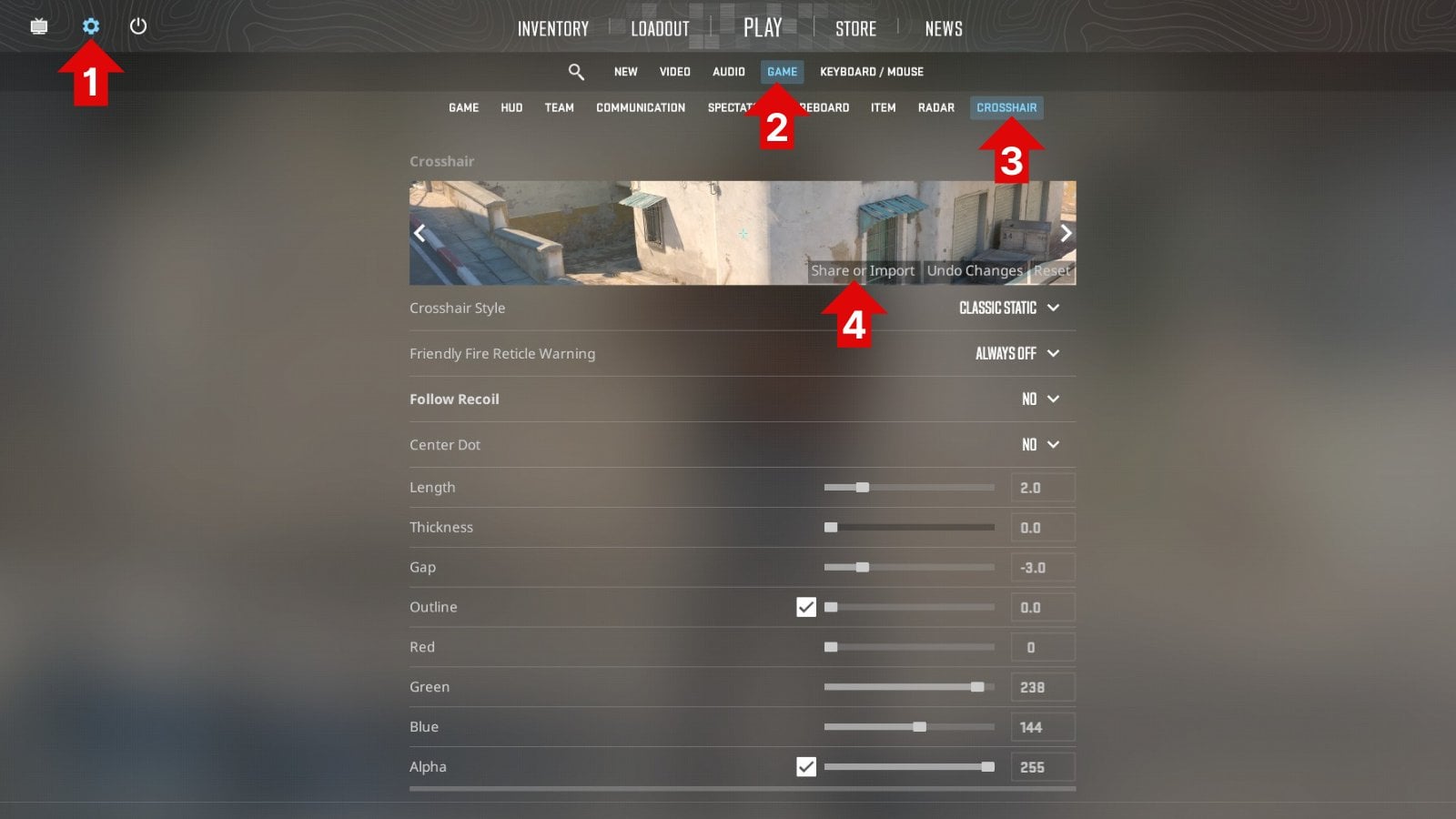
You can also import a CS2 crosshair using the old-fashioned way: by copying commands and pasting it in the console.
- Copy the crosshair commands (highlight them, right click them, and click ‘copy‘ or highlight them and press CTRL + C)
- Open/start CS:GO
- Go to ‘Settings‘ -> ‘Game‘ -> Enable Developer Console and choose ‘yes‘
- Press the ~ key to open the development console (see HOW TO: Open Console in CS2)
- Paste the crosshair commands by pressing CTRL + V
You’ve now imported a crosshair via the console.
Best CS2 Crosshair for Beginners
Choosing a crosshair as a new CS2 player can feel overwhelming, but simple is usually better. In the very early stages of your learning process, you might want to go with a dynamic crosshair to help you visualize the movement penalty, but as you get more confident we would generally recommend a static crosshair.
Avoid overly large or dynamic crosshairs, as they can clutter your view and create bad habits. As you develop your aim and comfort, you can experiment with different sizes, colors, and styles to find what works best for you.
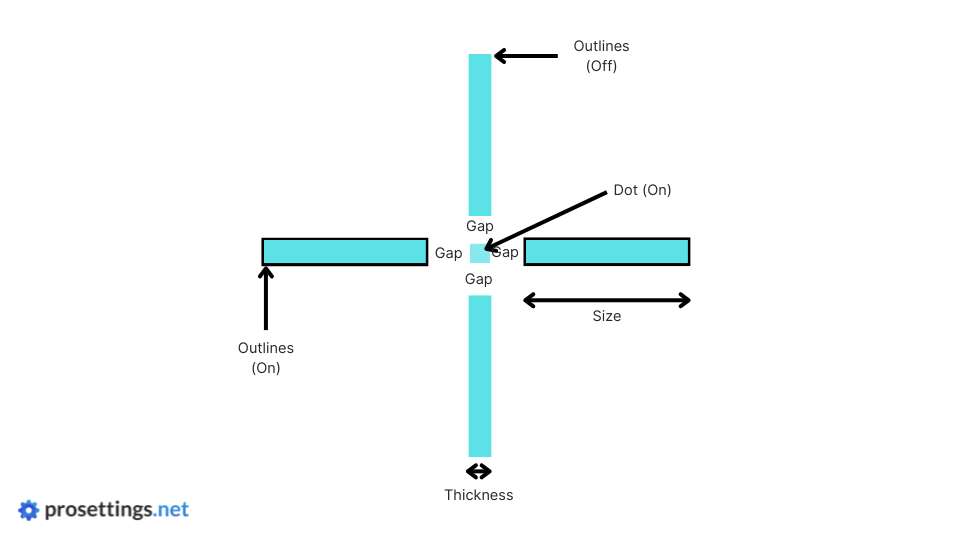
Crosshair Styles Explained
In CS2, crosshairs can be customized endlessly, but most fall into a few common styles:
- Static Crosshairs: These stay fixed while moving or shooting.
- Dynamic Crosshairs: Expand and contract based on movement or firing.
- Dot Crosshairs: Extremely minimal and often used for more precision, but harder to keep track of for newer players.
The best choice often comes down to personal preference and playstyle. Most pros stick to simple, static designs that keep the focus on precise crosshair placement.
How Pros Pick Their Crosshairs
Professional players typically choose crosshairs that maximize visibility without being distracting. Many pros prefer smaller sizes with a clear color contrast against all map textures. Since CS2 is heavily based on crosshair placement, pros generally prefer a design that allows quick target acquisition without cluttering the center of their screen. In general, pros prefer smaller, static crosshairs.
Conclusion
Simply copying the crosshair of your favorite pro player won’t instantly make you as skilled as that player, but it can be a good step in the right direction. Finding a crosshair that suits your preferences can greatly increase your consistency as a player, so we strongly encourage you to try out some of the best CS2 crosshair codes out there.
In case this list wasn’t enough for you, you can always browse our CS2 Pro Settings and Gear List or our CS2 crosshair database. We have hundreds of pro players in our database, and they are constantly receiving updates, so if you’re interested in checking out the crosshair code of your favorite pro player you’re in the right spot there.
If you want to tweak your settings in general, you can see our CS2 Best Settings & Options Guide.
Good luck finding your favorite CS2 crosshair code!


without Niko little white crosshair?