Introduction
VAXEE is a brand that is always tweaking and adjusting things. From firmware updates to new iterations of their products: their engineers and designers are never resting on their laurels. With regards to the NP-01s, we’re even already on the third major version in about three years. So naturally, we had to see if this new release is worth it. In our full VAXEE NP-01S V3 review, we’ll find out.
At A Glance
VAXEE NP-01S V3
Used by 8 players ()The VAXEE NP-01S V3 is a logical update that addresses pretty much all of the remaining issues that people had with their NP-01S line of mice. As such, this is basically the perfect version of this beloved design.
Pros
- New dongle represents a meaningful QoL update
- Web driver is amazing
- Great, unique shape
- Fantastic build quality
- Great finishing: clicks, side buttons, scroll wheel all feel good
- Good mouse feet
Cons
- A top-priced gaming mouse in 2026 should come with optical switches
- Expensive and difficult/impossible to get in some parts of the world
Specs
| Sensor | Core1 Sensor |
|---|
| DPI | 1-42000, in steps of 1 |
|---|
| Polling Rate | 1000 / 2000 / 4000 / 8000 Hz |
|---|
| Button Switches | Huano |
|---|
| Connection | Wireless |
|---|
| Shape | Ambidextrous |
|---|
| Length | 11.8 |
|---|
| Height | 3.7 |
|---|
| Weight | 57 |
|---|
| Width | 5.7 |
|---|
First Impressions
Packaging
VAXEE’s packaging has come a long way. From its ‘I bought this from a third part reseller on eBay’ packaging way back in the day, it then went to a more premium box, and now it even went a step further. The NP-01S V3 comes in a really nice box that reminds me of a premium smartphone box.
That’s nice, but obviously, the box isn’t all that important. It’s what’s inside that counts. And there, VAXEE also upped its game. Inside the box, you will find:
- The mouse itself
- A smooth plastic USB-A-to-USB-C charging cable
- The newly designed dongle
- User documentation
- Replacement mouse feet
- A small sheet of dot skates
Those last two points are very notable here. I have criticized VAXEE (and many other brands) in the past for charging a premium price for their mice and not adding replacement skates to the box. Here, they not only added replacement skates, but they also added dot skates for people who prefer those. Kudos to VAXEE for this.
The Mouse
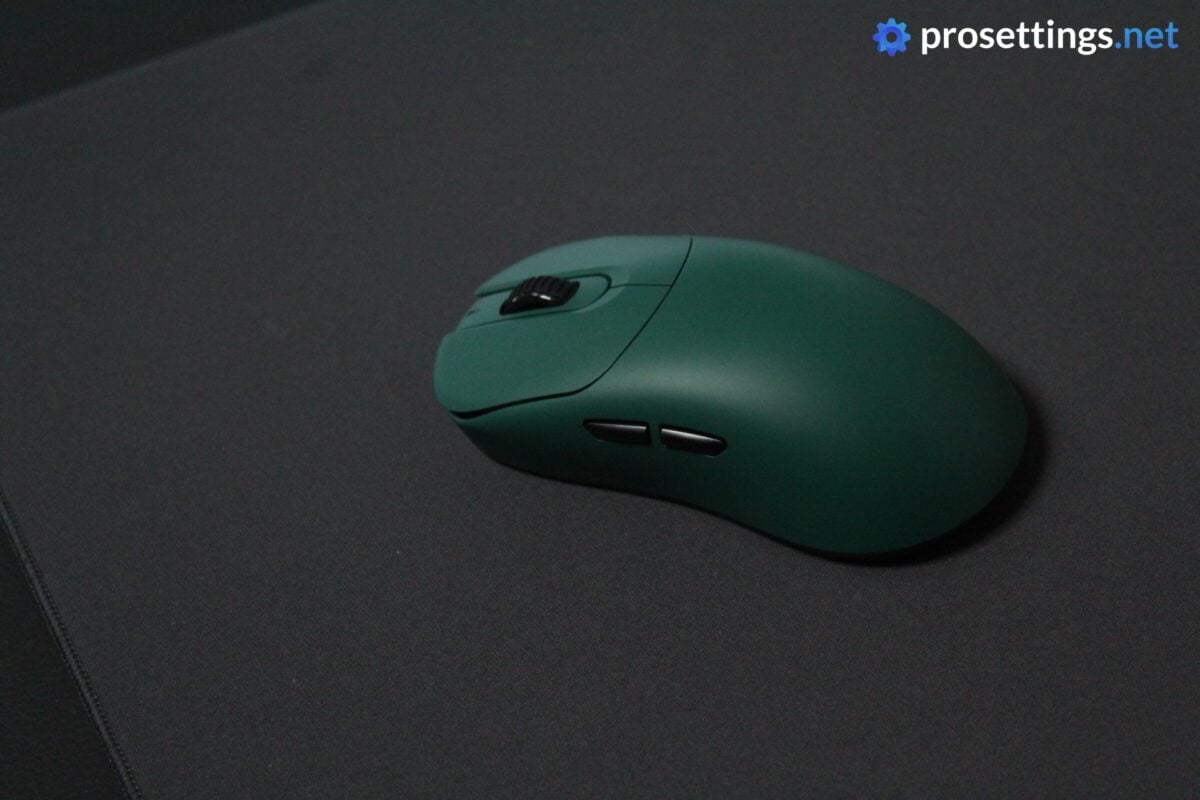
In terms of shape and design, the NP-01S looks very familiar. Indeed, nothing has changed about the exterior shell design. The only exterior changes are in the form of the sensor position (which has been moved) and slightly larger skates.
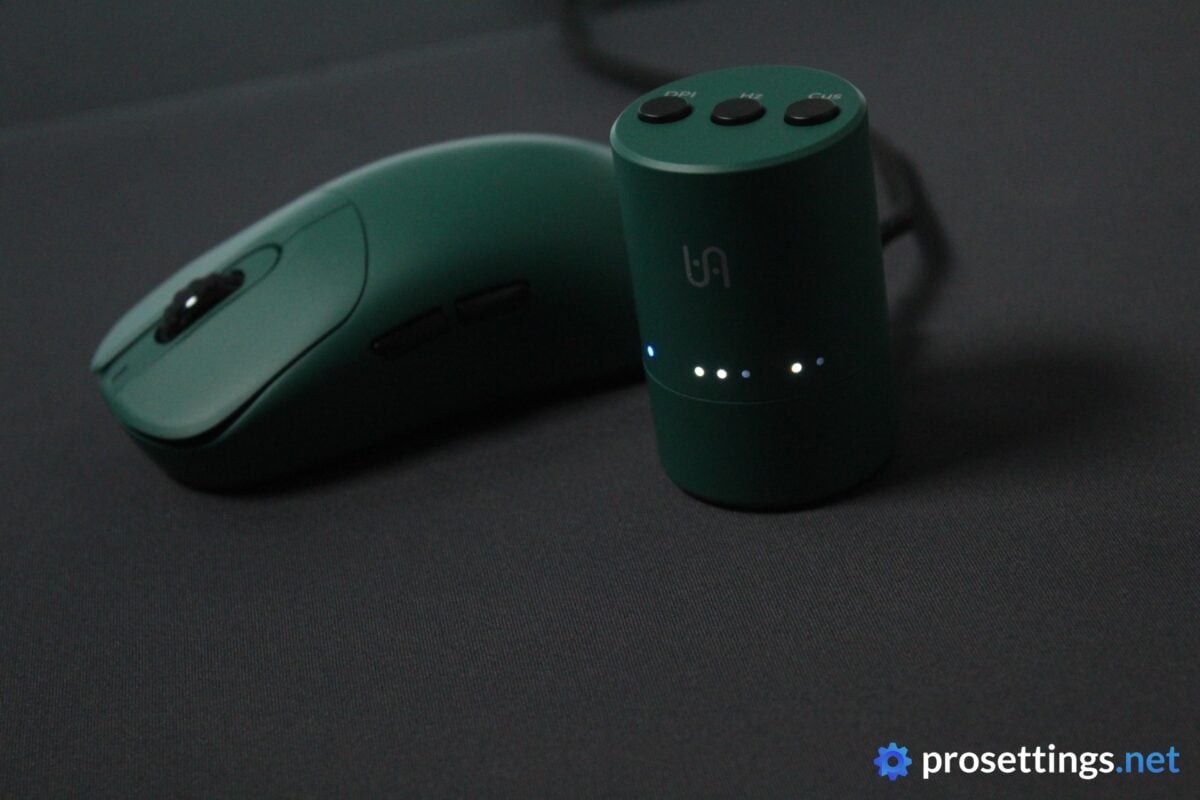
What is completely new is the dongle. This now looks like a miniature thermos and has buttons and LEDs on it. I like ‘functional’ dongles like this, so as far as I’m concerned this is an upgrade over the previous one. I’ll speak more about it later on.
Speaking of upgrades: it’s also the first time I’m seeing this Galapagos Green colorway. Personally, it reminds me more of British racing green, but I love this color. It’s very classy, rich, and deep, and it’s a nice change from the traditional black/white/neon colorways that we usually see on gaming mice. At the time of writing, the NP-01S V3 is also available in pink.
What’s Changed?
With this being the third iteration of this mouse in three years, you’d be forgiven for thinking ‘what was left to change anyway?’ I thought the same. But in reality, quite a bit has changed.
As mentioned, the sensor has been moved more towards the true middle of the mouse. On the V2, it was moved slightly off-center, which was a move that many fans of the mouse didn’t really like. The skates have also been made larger and a bit thicker.
Additionally, the dongle has been redesigned completely. It now also supports up to 8KHz out of the box. The bottom LEDs and control buttons have also moved away from the mouse completely and are now housed on the dongle. Finally, the V3 also debuts VAXEE’s new wireless tech (called ‘CoreLink’) and their new Core1 sensor.
So on paper, there are quite a few changes, but it also has to be said that most of these will not be very tangible to regular gamers. The V2 was, after all, already a top-end gaming mouse, and it was released less than two years ago, so its specs are still very current.
Personally, I kind of hope they’re done with the NP-01S for a while. There are enough reasons here for a refresh, and I get that it’s probably their best-selling mouse, but models like the E1 and the regular NP-01 also deserve some attention in my opinion.

Shape, Coating, and Mouse Feet
For context: I have 18×10.5cm hands and use a claw grip.
Shape
First off, it’s good to note that the NP-01S is a small mouse. It’s nimble, and not very palm-filling, unless you have smaller hands.
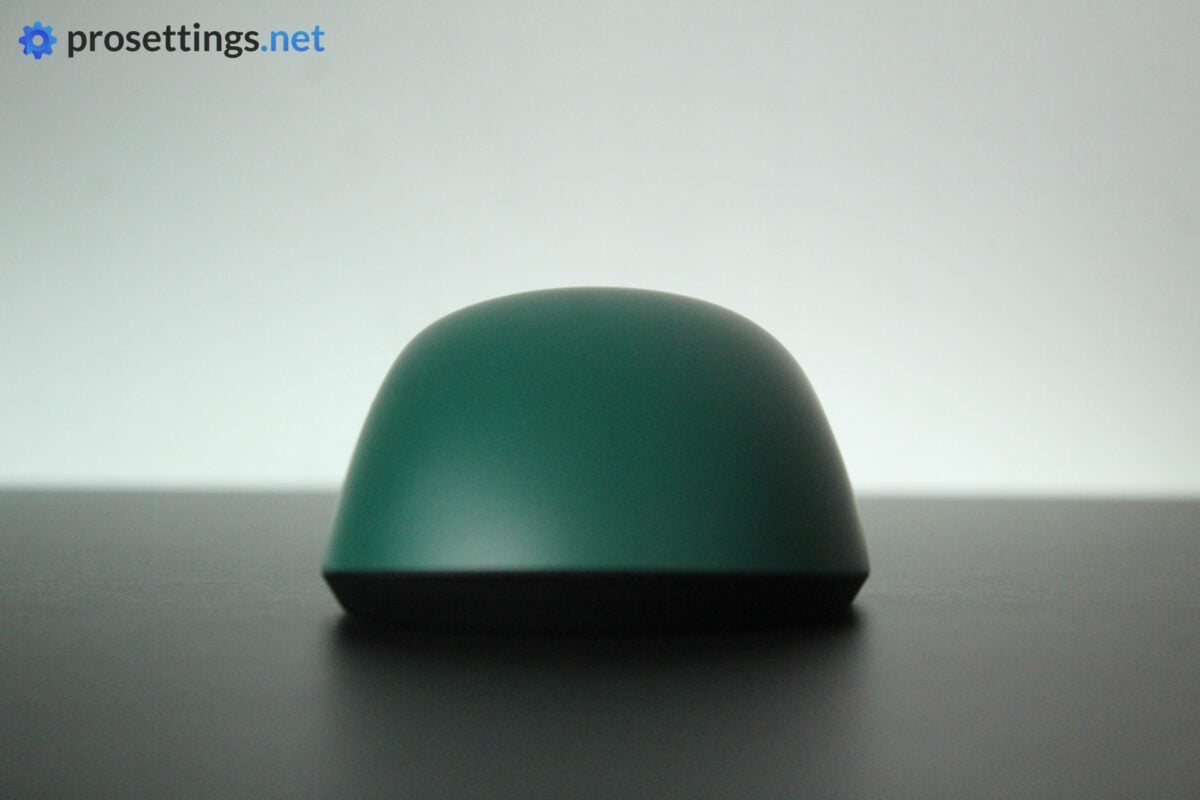
The shape itself, then, is a very interesting one. It remains one of the most unique designs you can find on the market today. The left side features a thumb groove with a pretty deep cutout, while the right side also has an indentation, but it’s placed further forward (where you’ll also find a slight overhang that makes picking the mouse up easier). The result is a clearly asymmetrical shape, but it feels like it’s an ambidextrous mouse at times since it doesn’t have much of the ‘common’ ergonomic curves and features.
The back flare also is asymmetrical; it builds up gradually on the right, while the left side widens more abruptly. Combine that with a hump that’s very low-profile and a design with little to no tilt and you’ve got a very interesting mixture between traditional ergo and ambi mice.
The S version is too small for my liking (so I don’t feel as if I’m getting the ‘maximum benefit’ out of the shape) but if you’ve always felt that ambi shapes are a bit too ‘unformed’ while ergo shapes are too curvy and lack maneuverability, this might absolutely be the shape for you. I personally really hope to see a regular version refresh soon, as I love this shape.
Coating
The coating on VAXEE mice has been great in terms of performance for quite some time now. However, I’ve always had an issue with the way VAXEE coatings looked after a while, as they do not handle sweat and fingerprints very well. But I have to say that this feels a bit better on this NP-01S V3.
I’m not sure if they used a different coating or if it’s just a side effect of using this deeper, darker color, but I don’t tend to notice smudges as easily as before. It’s still not perfect, though. Heavily used spots develop a kind of ‘shine’ (which can be cleaned off) quite easily, so it’s still not the easiest mouse to keep clean.
If you’re not sensitive about this kind of thing, you shouldn’t worry, though. The coating feels great under pretty much all conditions and performs fantastically.
Mouse Feet
The larger feet on the bottom of the NP-01S V3 look and feel the same as the ones found on the Pulsar x VAXEE eS FS-1 and they are amazing. They are well-rounded, super smooth, and have a consistent medium-to-fast glide.
These are among the best stock feet on the market right now. Even most mouse feet enthusiasts probably won’t find a lot of reasons to swap these out.
I also briefly tried the dot skates. These are of a similar quality. They glide well, reliably, and are smooth right out of the box. I am not a fan of dot skates at all, so I can’t really compare them to popular aftermarket alternatives, however.
Recommended Grip Types
To me, the NP-01S V3 is a great claw grip mouse for people with small-to-medium hands. It’s also a good option for fingertip grippers due to the size. However, the unique shape is one of the best features of this mouse, so it doesn’t make much sense to get this mouse if you’re going to fingertip it if you ask me.
Due to the small size and lack of a big hump, I would not generally recommend this as a palm grip mouse.

Buttons and Scroll Wheel
Buttons
VAXEE’s click implementation hasn’t always been a straight hit for me, but I have to say that the brand is knocking it out of the park lately. These are regular Huano mechanical switches instead of opticals, but as long as you’re okay with that, they are among the best in the business.
Pre- and post travel on both buttons is exactly as it should be, and there’s no side play or switch grinding when a button is pressed either. The actuation feels very crisp and perfectly tensioned, making these a joy to use in-game.
The only downside here is that these are ‘just’ mechanical. I know a lot of people don’t have an issue with mechanicals, and I don’t mind using them either, but optical switches have evolved to the point where they can feel pretty much just as good as the majority of mechanical switches, and since optical have a number of objective advantages over mechanical ones, I’d love to see VAXEE move to optical switches in the future.
It’s not that optical switches will make you play better (they won’t) but this is a product priced in the highest bracket, so I would personally expect it to have pretty much all of today’s ‘mainstream performance tech’.
Side Buttons
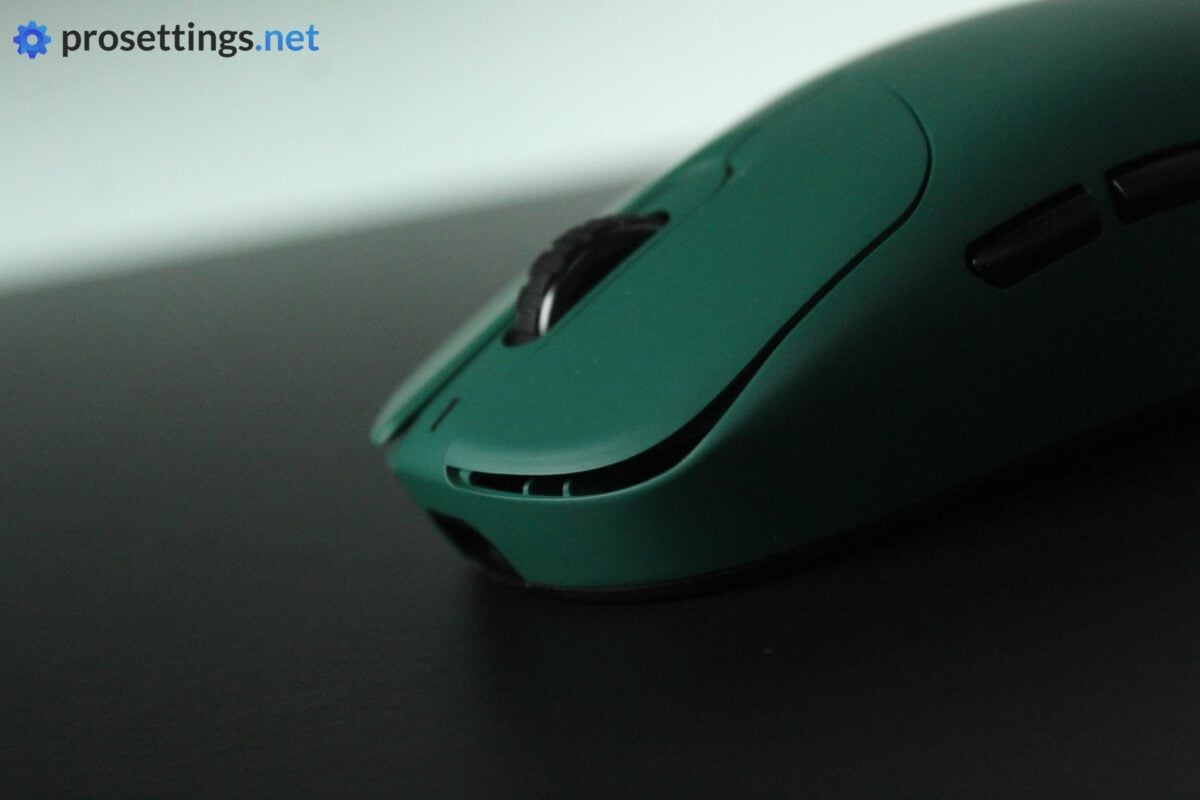
The side buttons have been redesigned slightly so that they’re easier to tell apart when using them. I had no issues with that on previous models, but this isn’t a drastic redesign either, so you’ll feel right at home if you’ve used an NP-01S before.
In terms of feeling, these are, once again, great. There’s pretty much no post travel present, and the buttons feel consistent no matter where you press them. They also actuate with a tactile click, making them feel crispy and consistent rather than mushy like you get with some side button sets.
Scroll Wheel
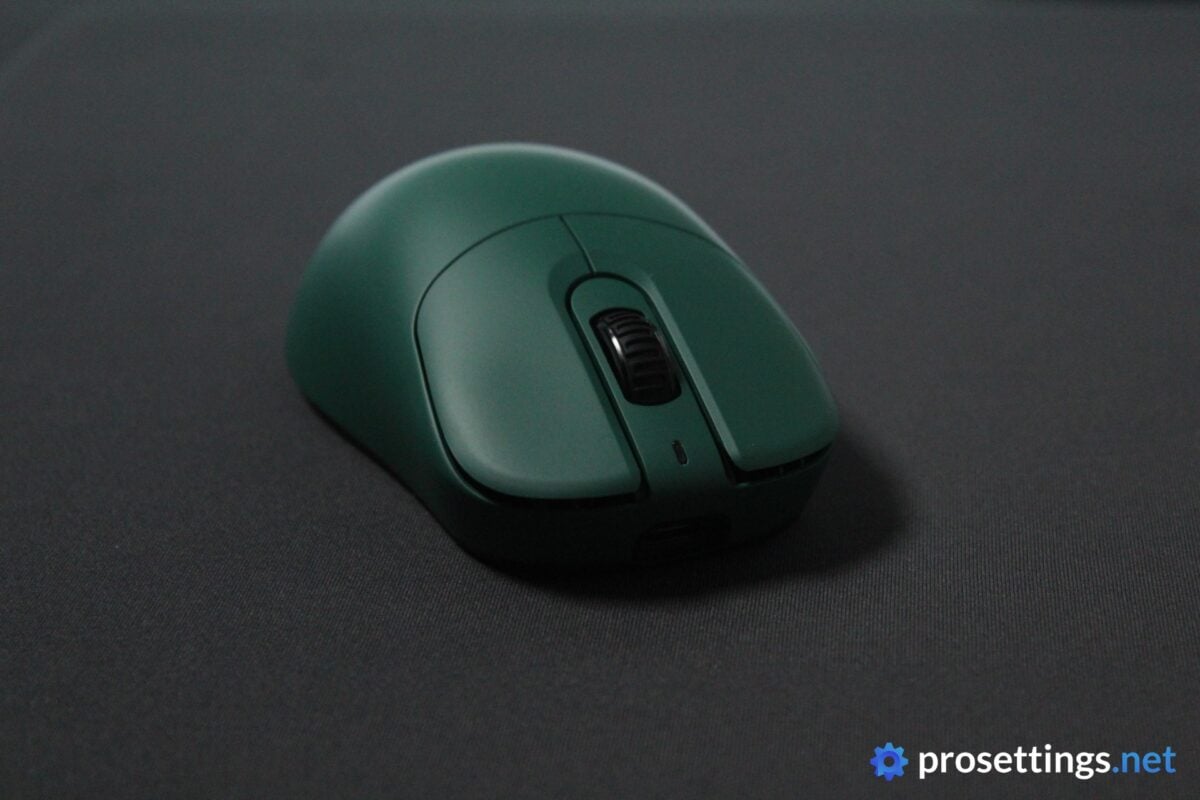
The good news show continues with the scroll wheel. This is heavily textured for added grip, nicely tensioned, and decently quiet. If you’re looking for a super smooth scroll wheel, this is not it, as it has quite a bit of definition between steps, but otherwise, you’ll likely have no issues with this at all.
Pressing the wheel also feels good. It’s tensioned in a way that I did not have any accidental scrolls while pressing, nor any accidental presses while scrolling.
Build Quality and Weight
I have handled many VAXEE mice, and I can’t recall ever being disappointed with the build quality. And indeed, it’s the same with the NP-01S V3. It’s extremely solid and well-built, with a shell that doesn’t flex, no matter how much pressure you put on it. The mouse itself is also dead quiet when you shake it around or tap it on your desk, indicating that there are no loose parts inside the shell.
In general, the NP-01S V3 just feels very high quality, from the packaging to the skates to the QC.
In terms of the weight, it’s not exactly a world beater. At 57 grams, it’s not part of the race to the bottom of the scales, but VAXEE never had any interest in joining that race anyway. And that’s fine to me. Not every brand needs to aspire to get as close to zero grams as possible, and many people still prefer mice in the 50-60 gram range. Pros included.
So, to me, the weight is not an objective downside, because it’s well within the currently acceptable weight range for performance mice. What also helps is that it doesn’t feel like its actual weight. Due to the small size, great weight balance, and fantastic feet, it actually feels a bit lighter on the pad. But obviously, if you desire a featherweight pointer, this won’t be it for you.
Sensor and Everyday Performance
Sensor
The NP-01S V3 is the first VAXEE mouse to feature their custom-designed Core1 sensor. If you’re wondering whether that represents a noticeable upgrade in-game, I can be quite short: most likely not.
Modern gaming sensors have been flawless for a very long time now, so you can expect perfect tracking and gaming responses from any well-implemented sensor.
With that said, I do always welcome improvements, and this Core1 sensor does bring some more customization options to VAXEE products. For starters, you can configure the DPI in increments of 1. I don’t know anyone who really needs that level of granularity, but it’s impressive. Furthermore, there are now more LOD levels to choose from; five instead of two. The Core1 also has a higher max tracking speed, but you’ll never go faster than the max tracking speed of a 3950 sensor anyway, so that’s mostly a theoretical improvement.
So, as you’ll be able to read, this new sensor will not represent a noticeable change in-game for 99% of players. VAXEE mice have been performing flawlessly in-game for many years now. But, as long as new tech can get implemented without messing with the usability or price of a product, I am all for it, so I’ll congratulate VAXEE for their new sensor here.
In-game, it performs as expected. I did not notice any sensor errors or tracking issues in my testing.
CoreLink and New Dongle
VAXEE’s new dongle design isn’t just for show. It’s also to house their new CoreLink wireless receiver system.
To be clear: there wasn’t anything wrong with VAXEE’s previous wireless implementations for the vast majority of users. In fact, VAXEE mice quite often rank among the best-performing mice on the market. However, it seems that some pros noted interference issues in extremely busy environments (arenas for tournaments etc.) with lots of wireless signals, and CoreLink is a response to that.
According to VAXEE, this new tech will always ensure stable performance, even in those crowded arena setups. I can’t test for this myself, as I’ve never had any noticeable interference issues with mice, but I’ll say the same here as I said with the sensor: I always welcome improvements.
Configuring The Mouse
The ‘quickset’ buttons on the bottom of the mouse have been moved towards the dongle. With these buttons, you can change the polling rate, DPI, and switch between three different profiles. There are handy LEDs present to show you exactly what setting you’re on.
What I love here is that you can also quickly check the battery life by pressing the middle and right button together. That’s a nice QoL feature with these LED dongles.
People who want more in-depth customization can use VAXEE’s web driver. There, you can configure the different profiles, change the click latency, finely tweak the DPI, and so on. Do note that there’s no in-depth macro support or anything here: VAXEE mice are still very much focused on competitive (shooter) gamers.
In essence, I really love the way VAXEE is going with this. The web driver is clean and user-friendly, and I love this pivot towards more substantial dongles (Razer has also been doing this, for example) that have some controls and some basic info on them. I personally really don’t need a gaming mouse dongle to be super tiny, as that only makes it easier to lose, so I hope other brands also follow this design trend now that we’ve gone away from dongles that can directly plug into your PC.
Battery Life
The battery life of VAXEE mice isn’t something to write home about, but it’s not dramatic either. With Competitive Mode on, you’re looking at around 23 hours at 8000Hz, but only 32 hours at 1000Hz. That’s because competitive mode draws a lot of power to make sure the mouse performs as well as it possibly can.
Drop the mouse down to Standard Mode, and you’ll be getting around 100 hours of actual usage at 1000Hz. On previous VAXEE mice, I didn’t really consider swapping modes to be an option, since you had to go through some button combination hoops in order to go from Competitive Mode to Standard Mode. But with the new web driver you can very easily switch.
So, even if you intend to use it as a ‘one and done’ mouse for both productivity and gaming, you’ll get a lot more mileage out of one charge than before.

Alternatives
The NP-01 shape remains one of the most unique shapes on the market. As a consequence, I can’t really think of any alternatives that I’ve tested that are worth mentioning here. Your best bet is VAXEE if you’re interested in this shape.
If you want to go bigger, there is the NP-01 Wireless, but that’s quite a bit heavier as well and is only on the ‘V1’, so it won’t have the new dongle and all of that.
If you want to experience this exact shape at a reduced price, you can also always go for the NP-01S V2. It’ll be more or less the same in terms of in-game performance (unless you’re very sensitive to sensor positioning) but won’t come with the latest bells and whistles like the V3.
Conclusion
The VAXEE NP-01S V3 is a logical update that addresses pretty much all of the remaining issues that people had with their NP-01S line of mice. As such, this is basically the perfect version of this beloved design.
Personally, I would have loved to see optical switches. I think the technology has matured enough for it to be considered in VAXEE mice. But other than that, there’s very little to remark. The web driver is clean and easy to use, the dongle represents a meaningful QoL upgrade, and the mouse itself has very little objective flaws.
This is a great start to the ‘V3 era’ of VAXEE. I can only hope they now choose to spend some attention on their other models. I personally can’t wait for an updated regular NP-01.
This product was received for free from the manufacturer and given to our reviewer to test and review. Brands and manufacturers have no editorial control over our reviews. For more information, check out our review FAQ.
Former semi-pro gamer turned writer, product reviewer, and community manager.

